
As our article inca SmartProbe AI captures deeper insights from open-ended questions in Nfield explains, inca SmartProbe is a game-changer for market research surveys. Here, we walk you through the practical steps of integrating inca SmartProbe with Nfield and implementing it in an Nfield survey. Armed with this information, you should be able to run your first inca SmartProbe-enhanced open-ended question and understand how the process fits into the Nfield scripting and platform configuration.
This tutorial covers:
- Getting an API key from inca SmartProbe.
- Creating your Nfield script using the
*REQUESTcommand. - Setting up API configuration in Nfield.
- Running basic tests of the integration.
1) Get an API Key from inca SmartProbe
To connect Nfield with inca SmartProbe, you’ll need an API key that enables authorized probe-generation requests. You can obtain this key by contacting the inca team at [email protected].
After receiving your key, make sure to review inca SmartProbe API documentation in SmartProbe Studio to understand the pre-launch checklist, configuration options, and request/response format.
2) Write your Nfield script using the *REQUEST command
Nfield’s *REQUEST command allows you to call external APIs during a survey and store the returned data for follow-up questions, which is ideal for working with inca SmartProbe. Please refer to NIPO Academy Webinar #48 – The Request Command. See the script example below.
*TEMPLATE "NfieldDelhi"

*TEXTVARS Que1, Ans1, Que2, RequestResponse
*VARS RequestResult

*PUT Que1 "what do you think of the new drink?"

*QUESTION 10 *OPEN 61L2
*? Que1

*PUT Ans1 Q10

*REQUEST RequestResult RequestResponse "incaSmartProbe"

*PUT Que2 [?JSON(RequestResponse, 'probe')]

*QUESTION 20 *OPEN 63L2
*? Que2
*END
3) Configure API in Nfield Manager
Before the *REQUEST command can be used, Nfield must be allowed to communicate with external services.
Steps:
- In Nfield Manager, go to APIs.
- Understand the API configuration from inca SmartProbe Studio.
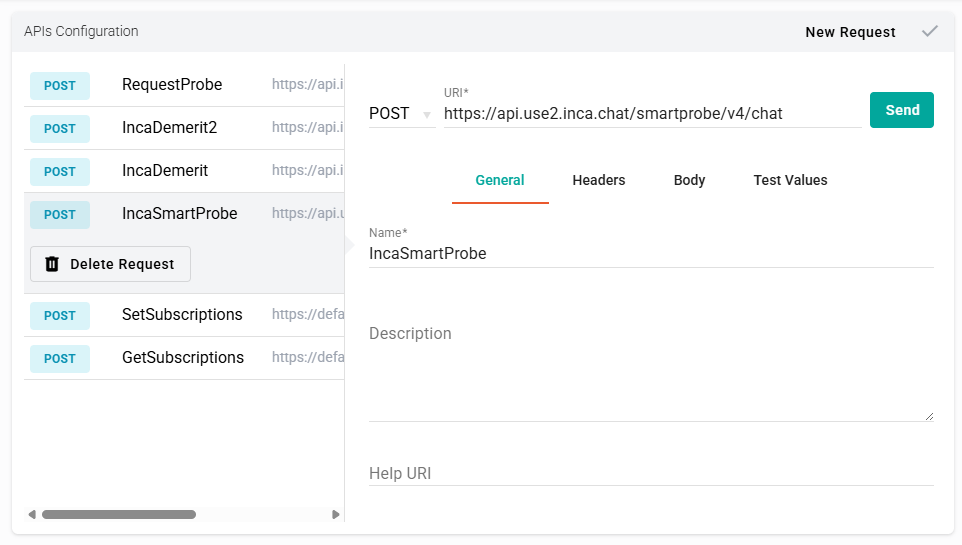
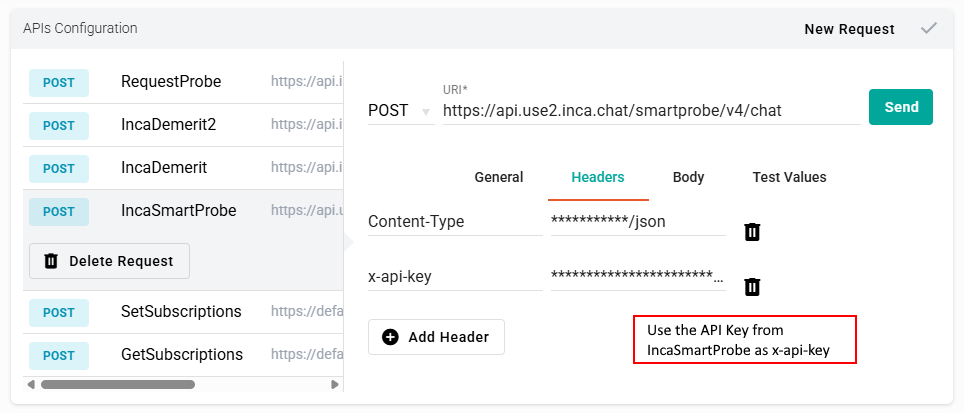
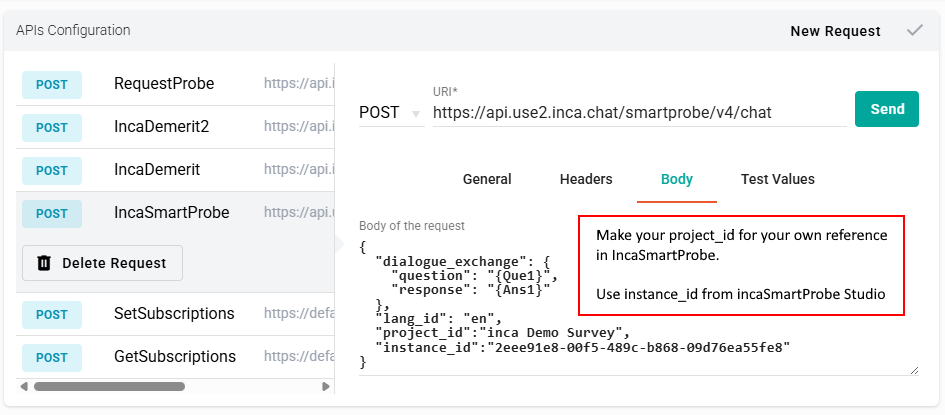
- Create a new API configuration (named incaSmartProbe) with the following configuration.
General tab:
Headers tab:
Body tab:
4) Run basic tests to verify the integration
After your script and API settings are in place, conduct a short internal test to confirm that:
- The first open-ended answer is successfully sent to inca SmartProbe.
- A probe question is returned.
- The probe is shown as the follow-up question in the interview.
- Nfield stores both answers so they can be used in reporting and exports.
At this stage, the goal is simply to ensure that the round-trip connection between Nfield and inca SmartProbe is functioning as expected.
Conclusion
This guide covers the first step towards using AI-powered probing in your Nfield surveys. Once the basic integration is working, we encourage you to continue exploring how to get even more value from inca SmartProbe, including:
- Saving generated probe questions in your dataset for later data interpretation and reporting.
- Providing richer research context and objectives for more precise probing.
- Using demerit scoring to enhance data quality control and respondent validation.
- Applying multi-probing logic to deepen insights across open-ended responses.
- Leveraging additional inca SmartProbe configuration options for different scenarios.
Before running the integration on a live project, it is important to work closely with the inca team to finalize your settings and confirm that your API setup meets the research requirements. As you expand your use of inca SmartProbe with Nfield, you will be able to bring more qualitative depth into quantitative research, which will help you uncover stronger motivations, emotions, and behavioral drivers at scale.