
Research projects often begin with a common overarching set of screening questions. How old are you? Where do you live? Which products do you use? Respondents’ answers indicate which surveys within the project they’re likely to qualify for.
But the process that follows can be messy.
First, you have to match all your respondents with appropriate surveys and send them the links.
After opening these, the first thing they experience is having to answer the same screening questions all over again. And if this isn’t bad enough, they could still find themselves screened out by the survey’s own additional screening questions. It all starts to feel like a waste of time.
Then there are the respondents who qualify for multiple surveys, which leads to even more work. As you strive to optimally distribute respondents throughout your project, you need to decide which survey to allocate them. What happens if your choice subsequently screens them out – are they lost from the project?
It all adds up to you spending a lot of time making decisions and connecting respondents to surveys, while risking drop-outs due to a clunky process.
Wouldn’t it be better if survey allocation and launch could be automated and streamlined so everyone enjoys a more efficient experience?
This is where the Nfield Screener feature comes in.
Meet Nfield Screener
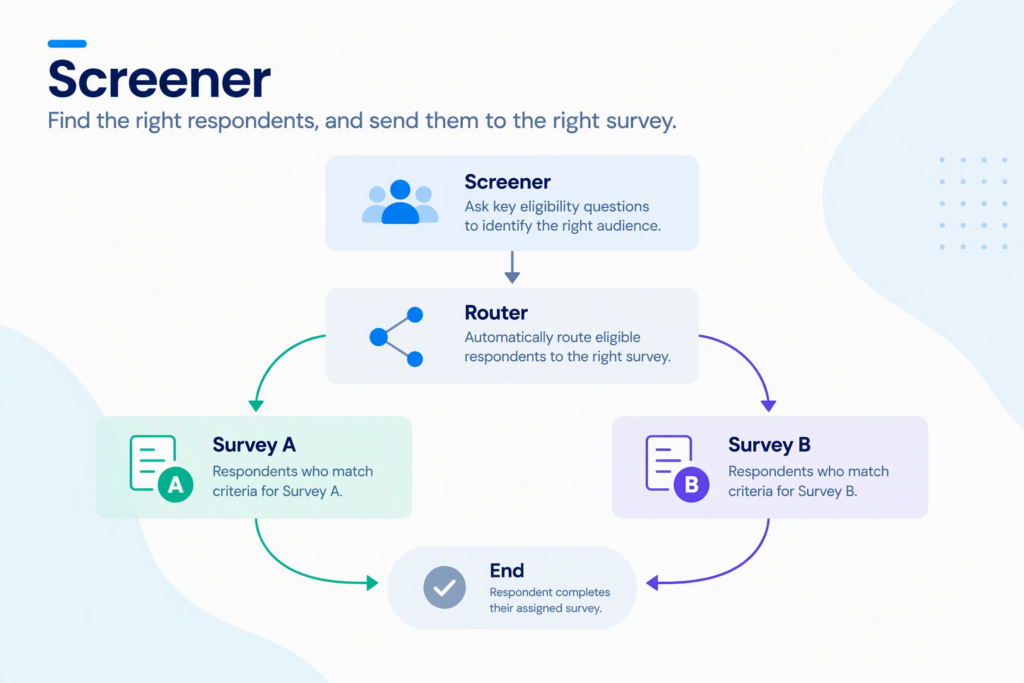
A Screener functions as an Nfield survey that contains all of your common screening questions, then automatically redirects respondents to the right surveys via a built-in router. Nfield immediately launches each survey as the respondent arrives via the Screener’s live link, without them having to answer the initial screening questions again.
When individuals qualify for multiple surveys, Nfield works out the best survey to send them.
If an individual doesn’t qualify for any connected survey, the Screener records them as having been screened out of the project.
Simple set up, maximum efficiency
Familiar code
Screener uses a standard ODIN script, so you can ask any type of question you choose.
Linking surveys
You connect the surveys the Screener routes to. These can be both regular surveys and trackers. When respondents are directed to tracker surveys, Nfield activates the tracker’s active wave.
For each connected survey, you set who qualifies based on any combination of answers to the Screener questions. Screener questions are set up as quota variables, which makes them available in the router.
Data continuity
Respondents’ answers in the Screener survey can be passed on to connected surveys as sample data. This saves respondents from having to answer the same questions twice, and the values are available in the connected survey’s script.
The Screener and the connected surveys are linked by respondent keys. Nfield can create these keys automatically, or you can use your own. Respondent keys let you trace which survey each respondent was routed to, and what the outcome was.
How Nfield prioritizes when respondents qualify for multiple surveys
When initial screening shows a respondent qualifies for multiple surveys, Nfield determines the best one to send them:
- With targets, least filled first – if any of the qualifying connected surveys have targets, respondents are sent to the one which is furthest from reaching its target.
- Targetless, random – if the qualifying connected surveys do not have targets (or if all targets have been met but targetless surveys remain), the router picks one of the qualifying targetless surveys at random.
- Another go – if a respondent is screened out by additional questions in the survey they’re sent, the router can redirect them to another survey they qualify for. You decide how many times this can be done.
- Only live surveys – stopped or paused surveys are automatically skipped.
Before you go live
As with any new setup, be sure to test thoroughly before launch. This is especially important if your process passes information via the URL or sample table, for example with panel integrations. Contact us at [email protected] if you need help.
Learn more
Watch Academy 79 – Screeners for a full demo, including router setup, response codes and data handling.
Let us know what you think
Nfield Screener is a new tool in the early stages of use. Aware of potential opportunities for improvement, we may add more capabilities over time. Your feedback will help shape what comes next, so please let us ([email protected]) know what you think!