
Get a first impression, scheduled soon.
Request a demo to see how NIPO can help you meet your requirements with our smart survey solutions.
This year we introduced several features that empower you to keep track on how you use Nfield. Features that are meant to give you an idea of your footprint on the Nfield servers. In this series of NIPO Academy sessions we will showcase the features we have introduced, like the domain usage report and the survey metrics, and give you tips on how to use these to your advantage.
NIPO is delighted to announce that its Nfield Online and CAPI software solutions have earned the 7th position in Capterra’s newly released Top 20 Most Popular Survey Software report.
Capterra evaluates software based on product data, validated user reviews and independent research and testing. It also analyses online search activity to generate a list of market leaders who offer the most popular solutions. The resulting assessments therefore represent a solid all-round appraisal.
Nfield’s inclusion in the 2018-19 Top 20 is testimony to years of hard work developing solutions which truly satisfy user needs. This has been achieved through working closely with the Market Research industry to establish these needs, complemented with dedication to formulating the most robust, user-friendly and cost-effective solutions.
See the full Capterra Top 20 Survey Software report
NIPO develops Online, CAPI and CATI survey solutions specifically to serve the needs of professional market researchers. For over 20 years, we have been working closely alongside market research organizations to continually deepen and freshen our insights into their challenges, in order to create truly purposeful solutions.
This unique bond means we have robust practical knowledge of how to efficiently organize survey distribution of any scale. Which enables us to serve our customers with exceptionally well-thought-through products, particularly when it comes to tackling large scale national and global projects. Our unrivalled combination of deep industry understanding and high-level IT expertise means our customers benefit from survey software which is genuinely designed with their success in mind.
With more than 200,000 users around the world, NIPO supports many thousands market research projects every year.

There are probably many occasions when you want to follow through after a customer interaction by sending them a survey. But even though their details are all neatly logged in your CRM, getting the invitation out takes a lot of effort.
First you’ll need to export the data from your CRM and import it into your data collection system. With a few more clicks, you’ll finally manage to send the email. It’s a manual process which is too laborious to be done in real-time, so ends up happening in daily or even weekly batches. Which means you lose the benefit of acting immediately.
Wouldn’t it be better if all this was automated? So your survey invitation email gets sent at the very moment your CRM is updated with the latest status. No waiting. No time-consuming clicks.
The good news is you can make this happen. The even better news is you won’t have to write a single line of code! Zero programming knowledge required.
It all comes down to integrating your CRM with Nfield. When this is done, updating a customer case record triggers your CRM to send the relevant information to Nfield, from where the instruction to send an appropriate survey invitation is automatically issued.
So how do you achieve this integration? You’ll need a good tool, a bit of curiosity and a clear mind. Maybe some coffee too?
The following guide shows you how to integrate Microsoft Dynamics CRM with Nfield. If you have a different CRM, you will need a different method. That shouldn’t be a problem – just contact us to ask how!
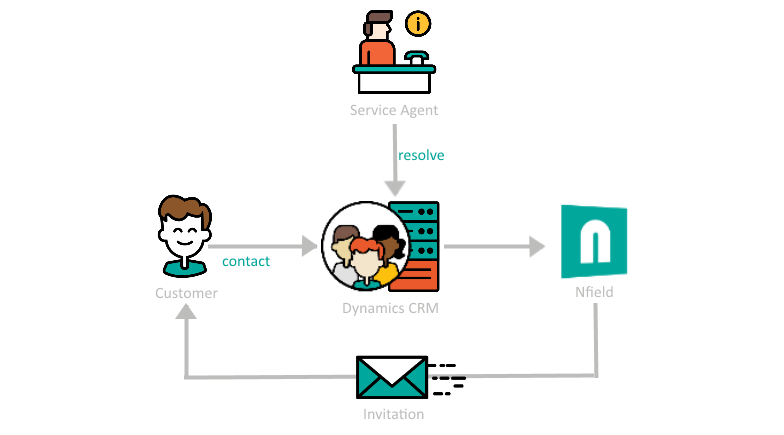
To keep things really simple, we’re using Microsoft Flow. This has a large set of components (known as Connectors) which you use to connect systems together, e.g. your CRM + Nfield. Each connector allows you to set triggers, which alert the relevant connected system when changes occur for which you want actions to be taken. The functionality is pretty powerful. And what’s more, it’s FREE!!
Let’s look at an example of a Dynamics CRM Connector which has 3 triggers and 5 actions.
Trigger – this monitors your CRM for specified events, such as when a record is created/deleted/updated. You just have to associate these with the way you use your CRM. For example, when a new customer is added, you know a new record gets created. So if you want the adding of a new customer to trigger an action (see below), you select “When a record is created” to be the CRM trigger. Or in the scenario of a customer case being resolved, you’d select “When a record is updated” to be the trigger. In this instance, the instruction will also need to be modified with an IF condition to limit the trigger to resolved cases only.
Action – this is a change to be made in the Dynamics CRM, such as create/delete/update/filter/retrieve one or more records.
In the following example, we’re using the scenario of a customer case being resolved.
The flow begins with setting a trigger to look for case entities which have been updated. This sets off an action to read specific details of any relevant entities. These details (email address, name, reasons for contact…etc) can be used further on in the Flow.
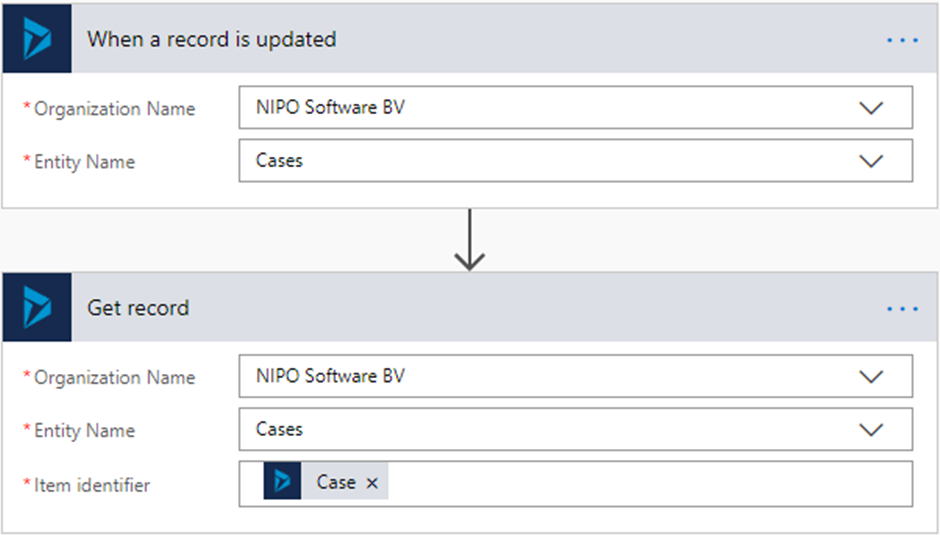
Now you need to make the connection with Nfield. You won’t find an Nfield Connector listed in Microsoft Flow, but Nfield has an API which can be reached by setting up an HTTP connector. HTTP will be offered as an action.
The first step is to log into Nfield by filling in a form, as shown on the screen below. The formats and values you need to enter are all described in Nfield API documentation.
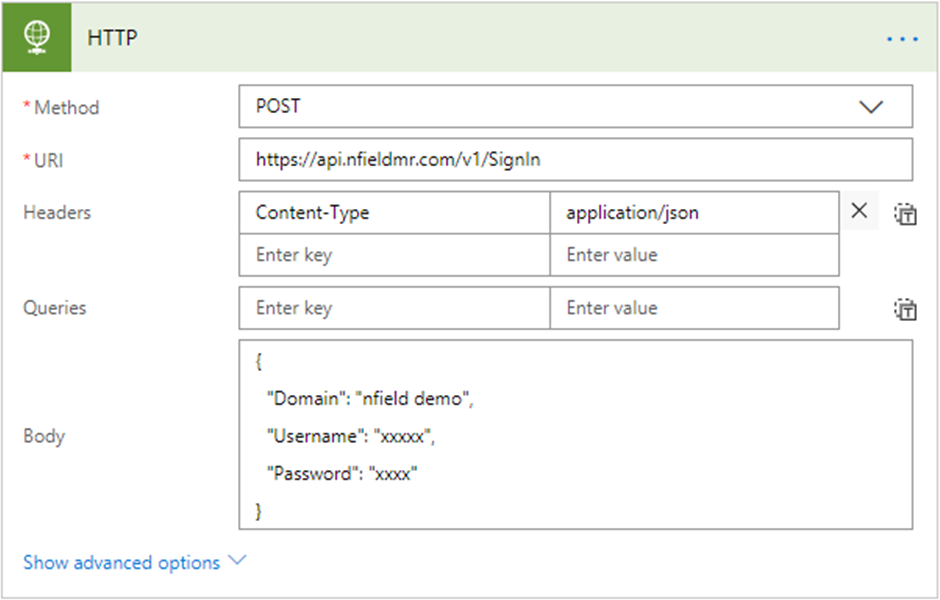
Once this is done, you can then continue to add more steps. In this scenario, we have added respondent data and created an email batch to send an email. As a bonus, we’re also triggering an SMS which will be sent using TextMagic.

Following-up with survey respondents by thanking them for their time, maybe with a gift or special offer, is a good way to build favorable relationships. Similarly, alerting relevant people on the commissioning side about any individual rating extremes enables them to take beneficial action. In both cases, speed is essential for positive impact.
Nfield Online users therefore often ask us if there’s an easy way to do this. Is it possible to automatically generate the sending of different emails, so appropriate messages instantly get delivered? Without doing any coding? We’re pleased to say the answer is “yes”!
You just need to set everything up via a simple external application. Let’s show you how.
Before we start, try our demo to experience how it works from the email recipient point-of-view. This example asks you to complete a one-question survey and then enter your email address. After you submit the survey, you’ll receive a thank-you email.
How easy was that?! Of course, if your survey is based on a pre-existing sample, the respondent will not need to enter their email address, as it will already be known.
There are a number of different ways to automatically generate these emails. We’re going to show you how to do it via an online platform called Zapier.
For those of you who are interested in the technicalities, this method uses an external API call in ODIN script. It’s a process which passes certain variables to an external web hook (a web address that receives data), and then sends an email.
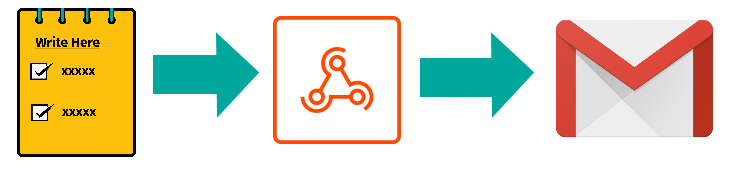
So your first job is to build a webhook. Let’s go!
Before building your webhook, you might like to understand what a webhook is and how it works.
A webhook is a URL which is called from your server, when the conditions you have set to execute an instruction are met. The webhook then instructs the next application in your workflow to do its stuff. The webhook thereby acts as a connector between different systems to automate workflow. For our purposes, when your email triggering conditions are met, the Nfield Online server will call the webhook, which then instructs your email client to send the relevant communication.
Here’s how to set up your webhook via Zapier:
1) Create a new Zap and select “Webhooks by Zapier” as your Trigger App.
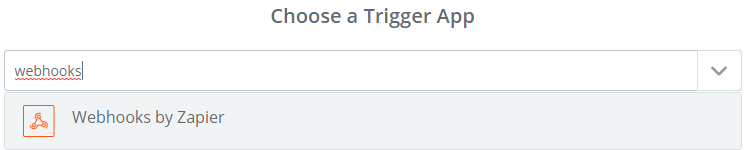
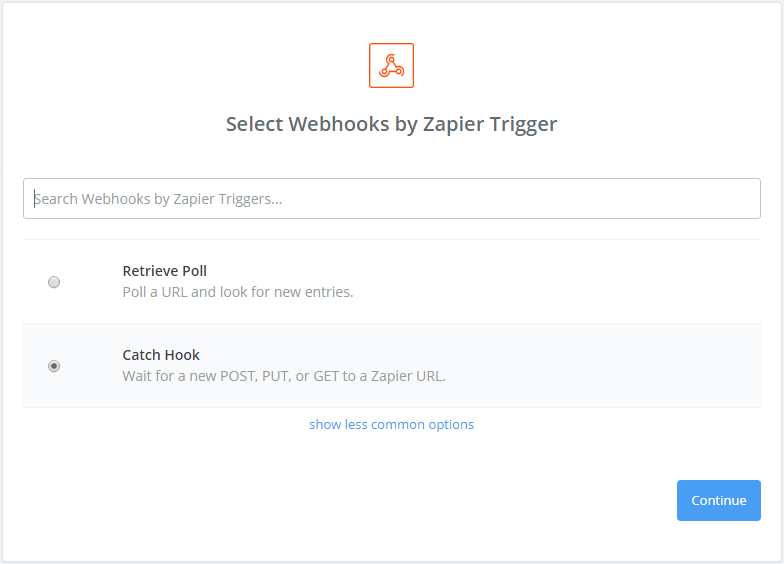
2) Select “Catch Hook” as the function
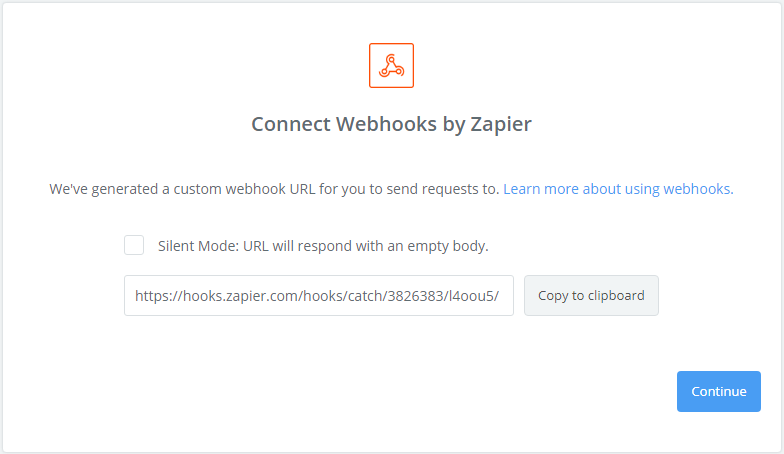
3) Save the URL provided. This will be your webhook to be called from Nfield.
4) Let the Zap know what information you are going to pass to it by setting the parameters. For example, these are likely to be Email, RespondentKey, Score and Name. Pay attention to the symbols which connect them. The first one has to be a question mark, then ampersands. Take a look at this example by opening it in your browser.
{URL copied}[email protected]&respondentkey=12345&score=5&name=Doris
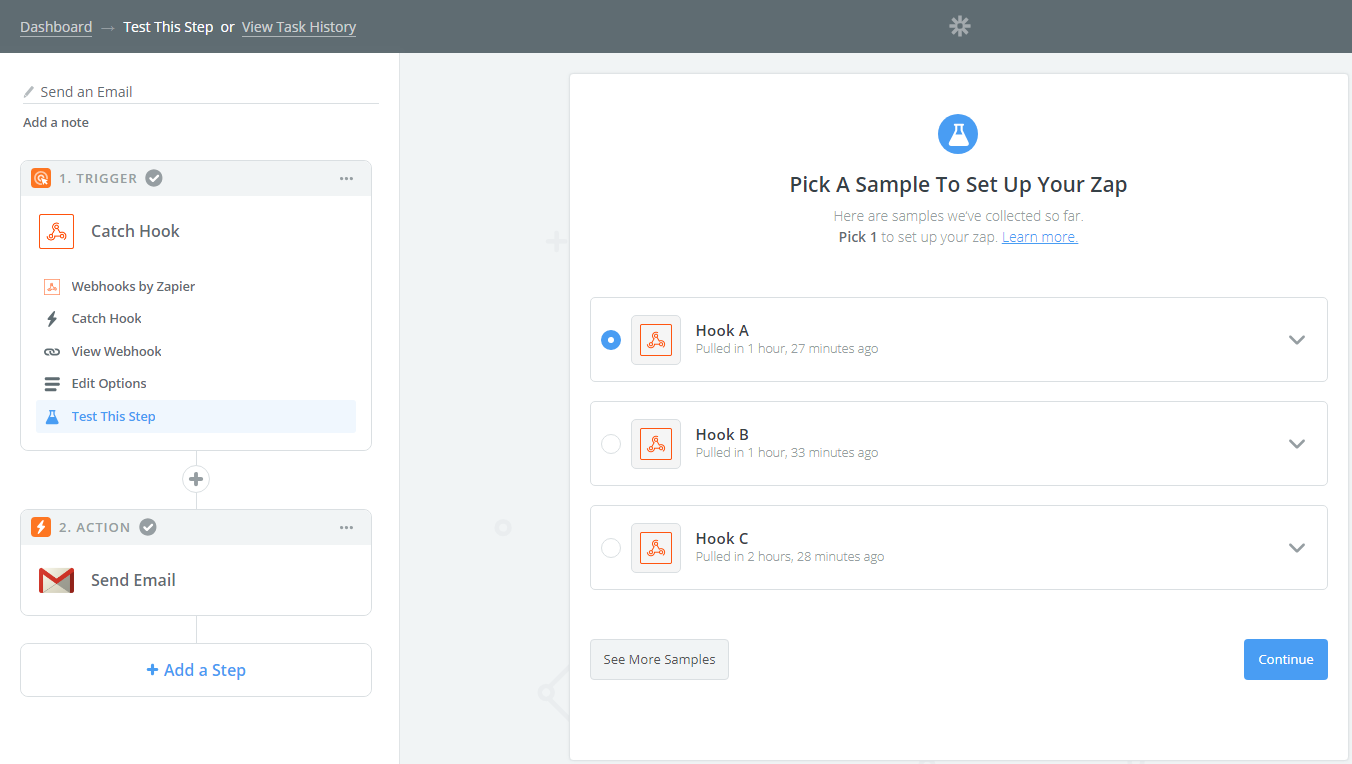
5) Test your Zap. Click “See more samples”. It will grab test results, which you can expand to check if they’re delivering the results you expect. If all is working as expected, select it and continue.
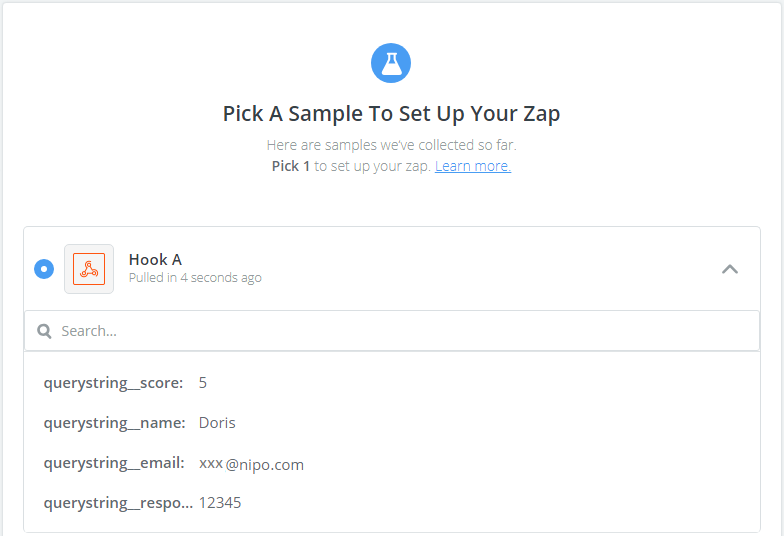
That’s it! Your webhook is ready.
The next thing you need to do is connect the webhook to your email client. We’ll use Gmail for this example. You also do this in Zapier, using the Gmail Zap.
1) When setting up the email Zap, you can insert the parameters passed via the webhook into the various email fields (To, Subject and Body). Take care to compose and format your message nicely. Note that HTML is supported in the Body field.
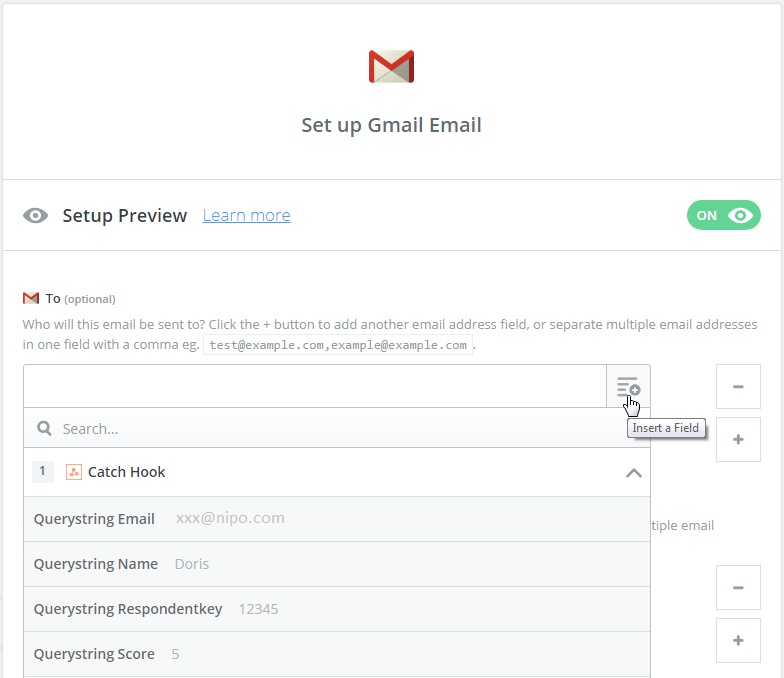
This is how it will look in your Zap.
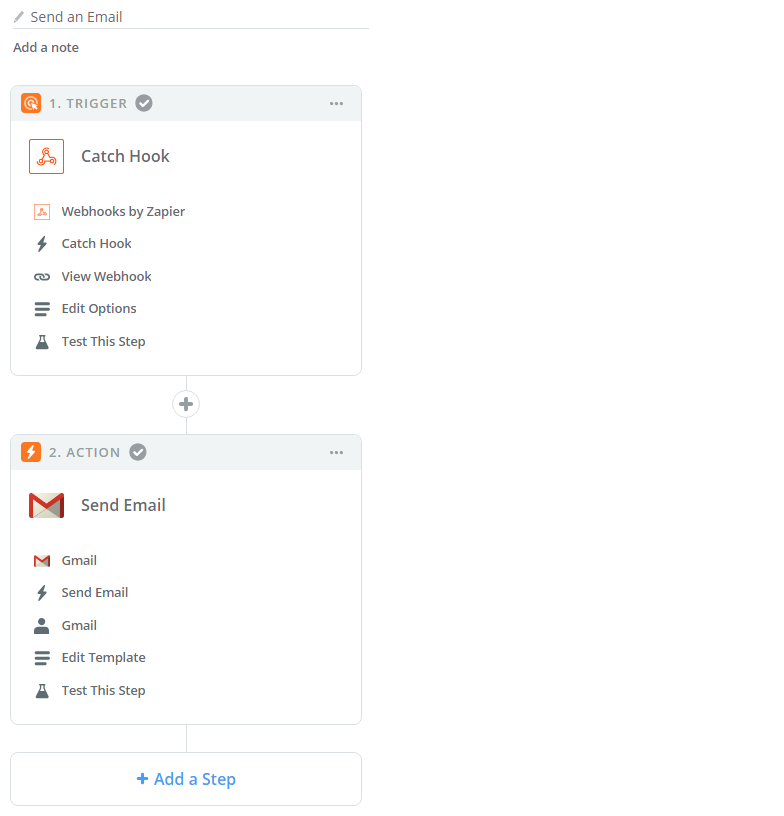
In Nfield Online, you’ll need to add an “API Endpoints” (APIS) entry. Don’t let this technical term scare you! We’ve made it all really easy.
1) In default settings, go to APIS tab. Add a new Endpoint. Give it a name and enter the webhook URL you were given by Zapier. Add a description and save.
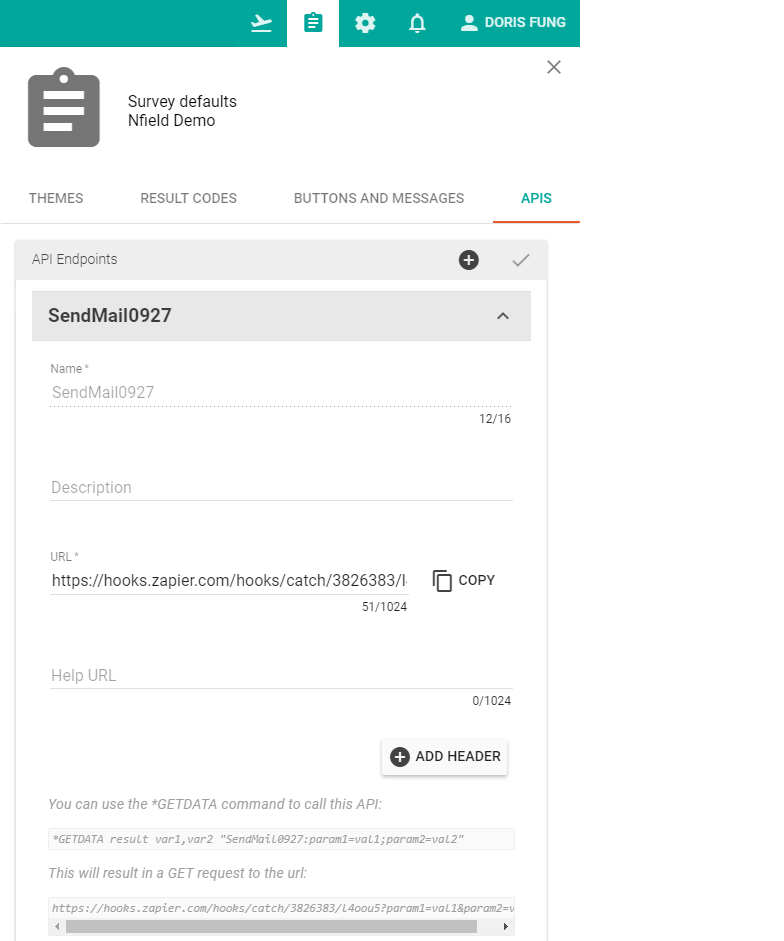
2) In the ODIN Script, we have the following to trigger this API call. Please download the complete script with this link.
*GETDATA result pair,ask "SendMail0927:email=*? Email;respondentkey=*? RespondentKey;score=*? Score;name=*? Name"
Now you can get a live link and try it out. Good luck!
Contact us to find out more about automating work processes using Nfield. Similarly do share your own examples that may benefit other Nfield users!

Understanding employee engagement is invaluable for improving a company’s productivity, quality and profitability. In recognition of this, many companies conduct annual employee satisfaction surveys, the results of which can be used for anything from obtaining employee engagement scores to delving deep into underlying details for guiding future strategy.
However, because these important surveys are often outside of the realm of the marketing department, companies don’t always think of turning to professional market research companies to conduct them. Which means a big opportunity is often being missed.
Employee satisfaction surveys carried out in-house, by a department without specialist market research capabilities, are likely to be very limited in terms of the level and quality of insights they produce. This is partly due to use of less complex, non-professional survey solutions and partly due to a lower level of knowledge and expertise when it comes to designing surveys and interpreting the results.
A dedicated external market research company using Nfield Online can deliver insights of far greater depth, quality and tangibility. This is achieved thanks to aspects such as:
If you’re already using Nfield Online, you already have all you need to offer superior quality employee satisfaction surveys alongside everything else you do.
If you haven’t yet discovered Nfield Online, here are a few of the powerful capabilities it offers, for every type of survey:
And these are just the start, because our family of survey software also includes CATI and CAPI, so you can offer the very best service through every survey channel.
Find out more about Nfield Online’s capabilities or contact us for further information.

In an age where off-the-shelf online survey (CAWI) solutions mean, in theory, that any company can conduct online market research in-house, professional market research companies have to offer a notably superior service in order to win business.
The specific knowledge and expertise possessed by dedicated market research professionals is, of course, a primary sales point. But making the most of that expertise calls for the right technical online questionnaire tools. It means working with an online survey platform which aids every aspect of the market researcher’s craft, from device-aware survey design to fast response processing, while making optimal use of online technology.
There are a number of basics that every professional online market research survey solution should provide. Here at NIPO, however, we don’t settle for the basics. Having spent over 20 years working closely alongside market research organizations to establish the industry’s needs and explore its desires and possibilities, this is how we deliver Nfield Online market research surveys.
Switching to a new, unfamiliar survey solution may feel daunting, but the rewards are well worth the investment. In the same way as we are acutely aware of market researchers’ needs, here at NIPO we appreciate the challenges that upgrading to a new solution might present.
For a start, you’ll want to see how Nfield Online performs for your specific needs, so you can tangibly evaluate its benefits over your current solution. No problem. We can work with you to set up custom demonstration projects.
You’re probably also wondering how your people are going to learn the new skillsets and ways of working they’ll need to take advantage of Nfield Online’s numerous capabilities. We’ve thought of that too. We can arrange all the training that’s necessary to get everybody up to speed, including when new people come on board, and even provide scripting services if that’s not one of your in-house skills.
Whatever your question might be, we’ll be happy to answer. So you can take your first steps to having a more user and respondent-friendly, secure, scalable and versatile solution that means you can always say “yes!” to even the most challenging of customer requests.

Customer satisfaction surveys, made immediately after purchase, account for 8% of all market research spending [1] and are the 4th most commonly conducted type of survey in the market research industry.
Much more than a way of keeping tabs on the customer experience, customer satisfaction surveys are an invaluable tool in the quest for customer retention and loyalty, as well as an aid for capitalizing on happy customers’ positivity. Taking appropriate action on the results can have a very tangible impact on future sales. Especially when it is applied to customers at extreme ends of the spectrum:
Acting fast
Obtaining insights into a customer’s purchasing experience, and feeding ‘urgent action cases’ back to customer service, needs to be done as quickly as possible after the purchase. Both for capturing the customer’s raw emotive feelings and to enable appropriate action to be taken within the most impactful timeframe.
Communication choice
Different customers prefer different methods of communication. Some are happy to respond online after contact via SMS / text or email. Others are more comfortable with speaking on the phone. And some prefer face-to-face interview.
In the case of negative experiences, such as payment disputes or complaints, which can become complex to resolve, customer preference is likely to sway more towards talking to a human on the phone (40%) or face-to-face interaction (23%) [4].
Over 20 years of working closely alongside market research companies all over the world has given us deep insight into this industry’s complex needs. We’ve made it our business to turn this into solutions which truly help market research professionals do their jobs better and deliver more satisfying results.
When it comes to customer satisfaction surveys, we’ve thought right through the process so everybody gets what they need.
Multi-channel flexibility
Availability of Nfield Online, CAPI, and CATI, with the ability to switch between them and synchronize results, means all respondent contact preferences can be met via a single integrated system.
Direct feedback
Any defined ‘trigger responses’ from the survey can automatically be forwarded to specified individuals on the end-client side. This automation means action-requiring alerts go immediately and directly to those who need to know.
External integration
Using the API, Nfield solutions can easily be integrated with external applications such as CRM systems for automatic loading of respondent profiles into surveys. And integration with social media enables fast, automated and holistic capture of customer feedback.
Appealing to use
The stunning, responsive, mobile first design provided via Nfield Online encourages respondents to complete surveys and voice their (dis)satisfaction more easily. After all, there is nothing more frustrating to an already frustrated customer than a satisfaction survey that’s an effort to navigate through, especially on a mobile device! With Nfield, that doesn’t have to happen.
Nfield’s broad and highly customizable capabilities mean no demand, requirement or scenario is out of reach. No matter how niche, how large or how complex it may be. We are proud to bring you the future of customer satisfaction surveys!
Feel free to contact us to find out more about what we can do for you.

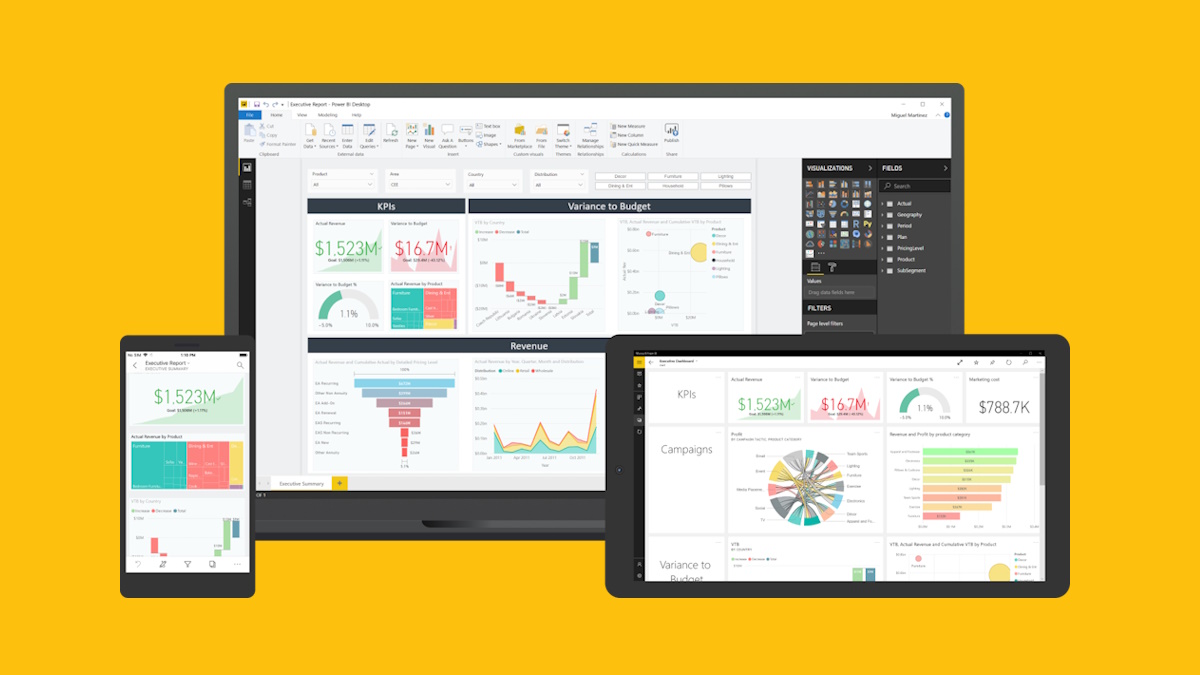
Since 23 April 2019, users of Nfield have been able to benefit from integration of Power BI for generating shareable Fieldwork Overview reports.
These standard reports enable you to monitor your Nfield Online and CAPI projects and easily share results with relevant parties. They can be found in the Reports section of every Nfield survey.
The new Power BI Fieldwork Overview report provides:
Nfield has been developed to produce data in a format that makes it easy to generate state-of-the-art reports via Business Intelligence tools. This means that, in addition to making use of the standard Power BI Fieldwork Overview report, you can create your own custom reports using either Power BI or alternative BI tools, without the need for additional data processing.
 Video
Video
Just prior to launching our Power BI integration, we held a webinar to introduce it to users.
You can access a recording of this session at https://www.youtube.com/watch?v=A5atUbx1bPY
Here at NIPO, we’re very excited about the opportunities Microsoft Power BI presents for the market research industry and see huge potential in how it can benefit our customers. Via both standard and custom reports. Although we are not yet at the stage where Power BI can completely replace your own data processing, it can already assist you in effectively monitoring and steering your fieldwork and creating custom dashboards, with very little investment. The ability to easy share reports with any relevant stakeholders, as needed, eliminates the time-consuming task of arranging access to fieldwork progress while also boosting transparency.
About Microsoft Power BI: Power BI is a suite of business analytics tools that deliver insights throughout your organization. It connects to hundreds of data sources, simplifies data prep, and drives ad hoc analysis. https://powerbi.microsoft.com
If you want to conduct an online survey that refers to frequently changing information, or needs to extract relevant information from a large database, you’ll need to connect your survey to an external source via an API. This is easily achievable with Nfield Online.
There is a wide range of scenarios which might call for this. To give just a few examples, you might want to show:
Or you might need to utilize real-time information to route your survey according to current stock status.
The connection to your external source consists of one or two components:
To illustrate how it works, let’s take a look at the Cryptocurrency demo we’ve set up. This demo survey connects to https://cex.io/api/tickers/USD/EUR to retrieve the latest cryptocurrency prices. As you can see, this URL takes you some JSON code. Copying this code into a JSON editor will present it as shown in the illustration below. Note that Nfield will only load the content from the “data” section and will ignore other information.
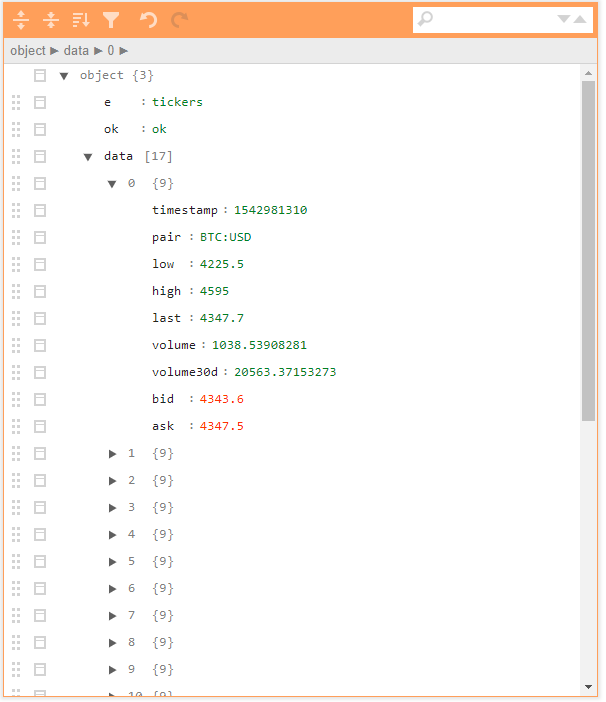
Step 1 is therefore to identify the URL to connect to your survey. However, every survey has its own unique requirements and ready-made API URLs are rarely available. Your IT team will actually need to create the URL(s) that return the relevant JSON format data results. Of course, NIPO can provide any support you need for doing this.
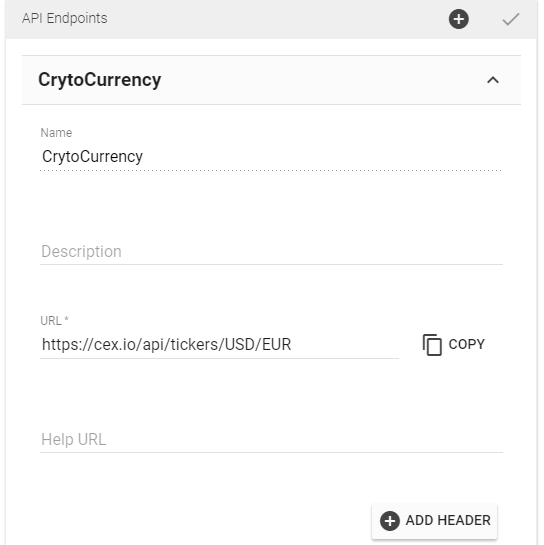
Step 2 is to set this up in Nfield Online. Under Survey Default Settings, simply add the URL as an API end point and give it a name. Doing this tells Nfield that calling “CryptoCurrency” from the survey script refers to a call to this particular URL.
Step 3 is to call the API from your survey setup.
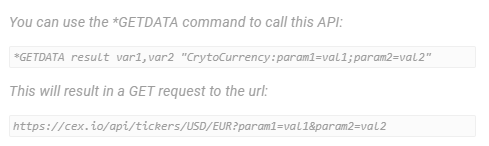
The call status is stored in “result” and the answers are stored in the arrays of var1 and var2. In our example var1 is filled with the ‘pair’ info and var2 with ‘ask’ (asking price) information, so our *GETDATA command looks like this:
*GETDATA result pair,ask "CryptoCurrency:"
Note that our demo example doesn’t utilize the second component option for parameters.
We hope this article inspires you to explore the possibilities opened up by the use of API endpoints. If you have any questions or require any assistance, please feel free to contact us.

In these Academy sessions we introduce a new document on paradata, tell you how to get to the paradata and give you a few practical examples on how you can use this data.
In an exciting development for researchers who survey respondents in China, NIPO is proud to announce the release of a new Nfield deployment from Chinese mainland. This makes Nfield the only international market research platform approved as an Internet Content Provider (ICP) by the Chinese authorities. Researchers and respondents alike can now enjoy a uniquely superior experience with Nfield, as data no longer needs to pass through the Great Firewall of China.
Why Chinese mainland deployment matters: The performance of outbound internet traffic in China is impacted by what is known as the Great Firewall of China. This firewall actively checks all connections to the outside world, including cloud-based online interviewing platforms. For Nfield Online users in Chinese mainland connected to the Nfield deployment in the Azure data center in Hong Kong SAR, this previously meant unpredictable delays in load times for new questions and thus a poor respondent experience, with high drop-outs as a result. This was not only the case for NIPO’s Nfield, but for all CAWI interview systems hosted from outside Chinese mainland.
The new Nfield China deployment has both its primary and backup locations hosted in Chinese mainland. This has been made possible through the Chinese Government’s full approval of the deployment and granting of an Internet Content Provider (ICP) filing. This gives Nfield a unique status within the international market research industry and enables us to provide an unrivalled level of service.
As well as the obvious benefits for online surveys, the China deployment also means improved interface responsiveness when setting up survey projects and managing fieldwork. And Nfield CAPI interviewers will benefit from faster synchronization with tablets.
Final stress tests were carried out in January 2019 with a group of pilot users. Following the successful completion of those first projects, the domain is now available for use and we are delighted to have already welcomed our first new customers on board. Existing customers operating in China will be invited to switch to the local deployment.
The Nfield China deployment is running the latest Nfield version and will remain in sync with updates applied to other regions.
 Nfield
Nfield is fully offered as a Software-as-a-Service model, which leaves you free from capex and servicing commitments. Nfield is the only survey solution hosted from the Microsoft Azure cloud, which guarantees superb performance, reliability and stability. In addition to the Nfield deployments in China, Nfield is deployed from Europe, America and elsewhere in Asia. Nfield is a fully scalable system that can handle extremely high volumes. Nfield is fully secure, with ISO 27001-2013 certification for both NIPO and the Nfield platform. NIPO and Nfield are both compliant with GDPR legislation.

Integrating Nfield Online with panel providers is simple and easy via common market research industry practices. When you have sample information from a sample source (your own panel database, or sample database from your panel provider or client), Nfield can facilitate the sharing of this information and the interview status between Nfield and the source(s) concerned. The following Q&A has been compiled to help you understand how it’s done.
Integration automates the sharing of information between sample sources and Nfield. It keeps both systems up-to-date in real time, without human intervention. The following examples illustrate how this is of benefit to all involved.
That’s entirely up to you and how creative you want to be (see Creative Online Survey Distribution). Nfield has an email management module for managing, sending and tracking email templates. To find out which options are available to you, please check with your own organization and your panel providers. They probably have their own member portal or app to facilitate management of invitations and rewards.
This depends on your needs.
Nfield provides a sample management module to facilitate your fieldwork operation. You can upload / download sample information in Microsoft Excel format or using our API (see API – What you need to know). You can modify or delete information as necessary. To comply with GDPR, you can also partially clear confidential information and/or delete interview data (see GDPR and Nfield Toolkit).
Nfield allows you to define your own RespondentKey for each sample. So you can use an ID provided by your panel provider (such as SampleID or PanelMemberID) as the RespondentKey.
When you upload the sample information to Nfield, simply include this RespondentKey as a field in the Excel sheet. Note that there is no requirement to upload sample information if you don’t want to. The panel provider can also distribute the invitation link directly themselves using the following format:

There are two options for this. You can either upload these details to Nfield or incorporate the information in the survey URL.
If you choose to upload the information to Nfield, simply incorporate the RespondentKey in your invitation link to make it appear within the questionnaire.
Or if you prefer, you can incorporate the sample information directly in the survey URL, as shown below, to get the same result.

Yes. This can be done using an encryption key which is provided in each survey. Please contact our helpdesk for details on how to implement this. The resulting URL will be presented as shown below:

When an interview is completed, the redirection URL can be configured to a page published by your panel provider or to one of your own, which can be defined according to the result code in each case. You can include whatever parameters you choose in this result code (e.g. RespondentKey, additional products, duration spent). The panel provider should process these codes to update their database so rewards can be given accordingly.
Nfield constantly checks the quota status while interviews are being carried out. If you have access to Nfield, you can get a quick overview of the current status via Nfield manager. Third parties (e.g. your panel provider/client) have the following options for keeping up-to-date.
Note that we are currently developing functionality for direct sharing of quota status with panel providers. Please check in with us on how this work is progressing!
Yes, with some modification to the questionnaire. Contact our helpdesk for details.
We know that every customer has different needs. If your questions / requirements aren’t covered in this article, contact us and we’ll be delighted to provide answers.

Do you read all your text messages? It seems you probably do! According to Esendex Research, in 2018 SMS messages have a 94% global average open rate. What’s more, 82% of messages are read within 5 minutes of receipt.
At NIPO, we believe SMS is a great channel for distributing invitations for online surveys. So we’re taking this opportunity to explain why, guide you through setting it up with Nfield Online and provide useful tips for making the most of it.
Distributing online survey invitations via text means you can reach a wider audience, really fast. Plus your messages stand out and get attention. What’s not to like?
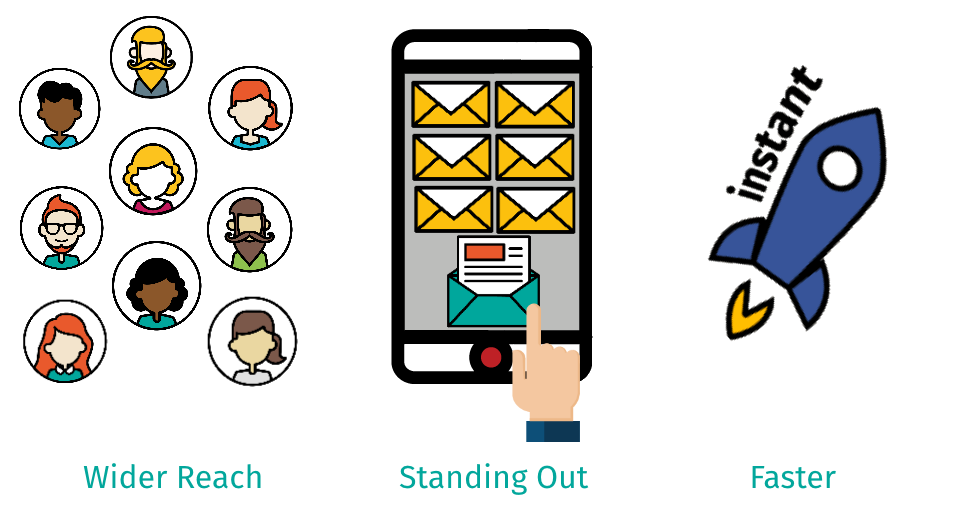
SMS is a faster way to reach respondents at key moments, with a higher chance of getting noticed and triggering action.
The first thing you need to do is find out who your SMS gateway providers are. This is easily done via a Google search for “SMS gateway providers”.
What should you look for in an SMS gateway provider? That depends on the level of technical integration you want. This can be broken down into three levels:
This is the easiest way to implement text messaging with Nfield Online. The illustration below shows how you can manually create an email to a specific address. If you want to send multiple emails at once, just use mail merge. Your SMS gateway provider will tell you how to construct the email address, which usually comprises a combination of the recipient’s telephone number and the provider’s email domain. Then all you have to do is compose your SMS content and hit send.
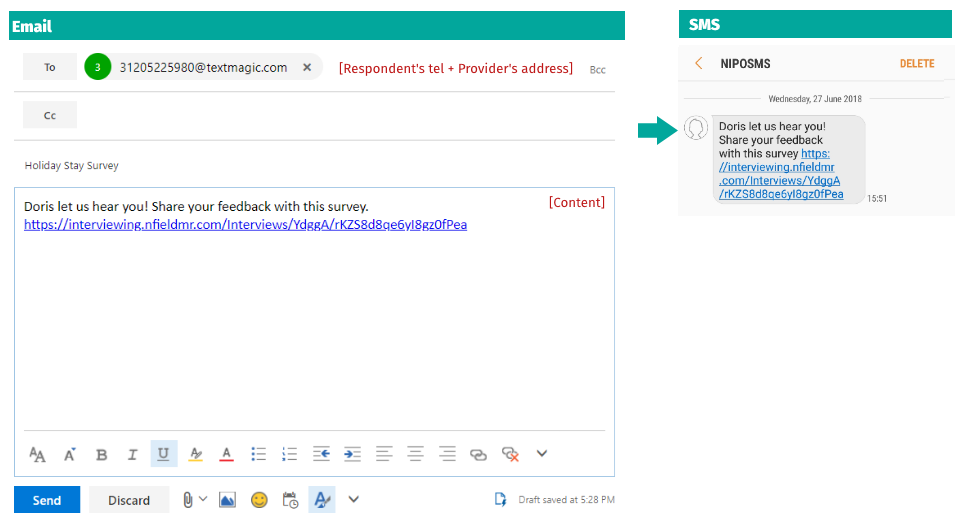
To show you how this works, we’re using TextMagic’s solution as an example. The first thing you need to do is set up your contact list in a contact group by uploading an Excel file. Then compose your email and use the relevant Excel field (e.g. First name) for personalization. TextMagic also lets you configure the sender name to be your company/client name and schedule a distribution time.
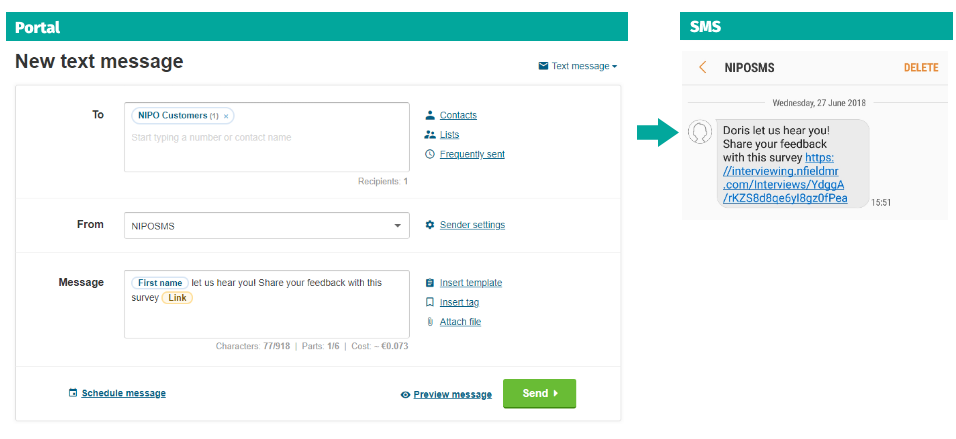
We talked about the technical side, now let’s give you some recommendations to make your SMS campaign a success.
Content
Timing
Get permission
We hope you have found this information to be informative and inspiring. Please feel welcome to contact us if you’d like to explore your possibilities together. We love hearing about our customers’ individual challenges and seeing what solutions we can offer. And we love hearing about your successes too!

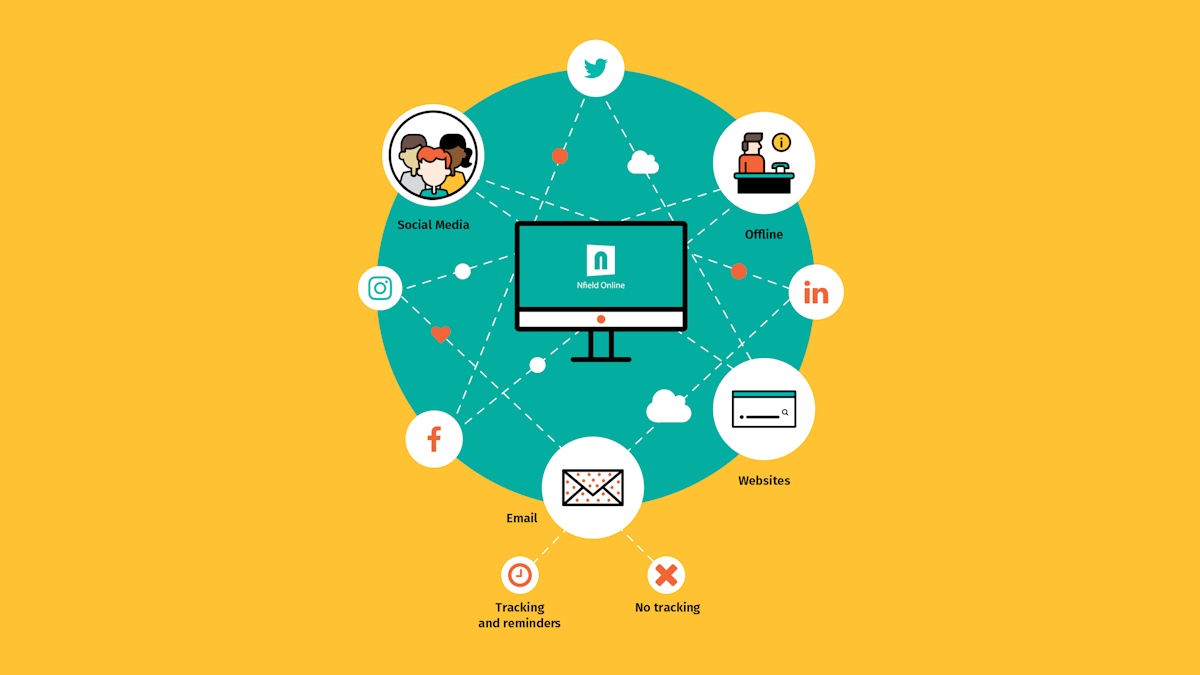
Open online surveys can be distributed via a whole range of methods. You’re not just limited to email! This means you have opportunities to be creative and try out different ways as you reach out to more interactive audiences. Take a look at our ideas and share yours with us.
Facebook is the world’s most popular social media network with over 2 billion active users every month. That’s a huge collection of sociodemographic data for your surveys! However, the organic reach on Facebook is not what it used to be and won’t be sufficient for distributing your online surveys. These days, Facebook’s real potential lies in paid posts and ads. Facebook offers impressively extensive and detailed options for targeting, which enables you to pinpoint the exact audience you want to reach.
Since its launch in 2003, LinkedIn has gathered over 547 million professional users and one million company profiles. These volumes are very interesting if your surveys research professionals and industries. Within LinkedIn you can share a survey as a company update, a personal post, banner, text ad or send it directly to selected individuals as a private message.
Twitter’s audience comprises 310 million monthly active users. It is more diverse as engages consumers and professionals alike. Within Twitter you can use ads to target people based on their location, age, gender, device or keywords.
In China, some market research organizations use a local social media network called WeChat to distribute online surveys. The WeChat messaging app is massively popular in China with 768 million active users every day.
Most popular messaging apps per country
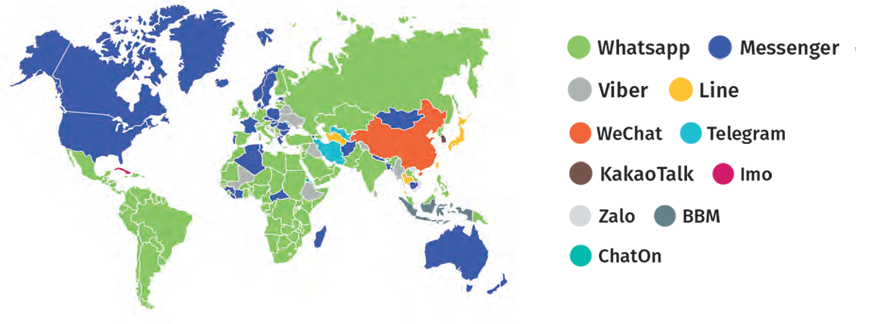
Although WeChat’s network structure is often compared to WhatsApp or Facebook, it is, in fact, very different. The WeChat app has been evolving into a full-service platform as it strives to be everything at once: a place for chatting, shopping, gaming and banking. Alongside a wider range of services, WeChat’s users benefit from easy integration with other apps, including Facebook.
All this makes WeChat a fantastic opportunity for engaging different audiences across China. For example, if your organization has a company page on WeChat with followers, then it’s possible to display your survey link either on your page or send it directly to followers via a private WeChat message. To incentivize followers to respond the survey, you can redirect them from the WeChat app to the company’s website where a reward awaits.
Even though this idea is easy to implement, it still requires a bit of technological knowledge. You can take advantage of our experience with this solution by deploying your WeChat project through Nfield Online.
WhatsApp currently holds the status of being the most popular messaging app in the world. The Facebook Corporation bought WhatsApp a few years ago and in 2016 partly integrated user accounts across the two apps. Even though this has happened, the Facebook Corporation remains very cautious about privacy and spammy user experiences and doesn’t allow third-party ads to be displayed in WhatsApp. Compared to WeChat, WhatsApp’s commercial usage is more restricted and it doesn’t allow for distribution of online surveys in the same way – at least for now.
Offices, reception desks, shops and presence at trade shows, seminars and other industry events are all physical touchpoints between companies and potential survey respondents. Printed materials, interior décor, products and touch screens all provide opportunities for inviting survey participation. Which means you can turn any physical environment into a place for conducting everything from customer or employee satisfaction surveys to product research.
Quick Response (QR) codes are those digital squares you find in all kinds of places. The square contains a unique two-dimensional, usually black and white code, which can be read via dedicated QR barcode readers and smartphones. You can easily generate unique QR codes for your surveys with simple tools such as www.qr-code-generator.com. These can then be printed on business cards, product sheets, leaflets, posters, packaging and even products, and displayed in exhibition booths, reception areas, around premises, on vehicles and more.
It’s worth remembering that printed QR codes will remain in circulation for an indefinite period of time. This means they are only appropriate for surveys which will remain active for a long time, such as ongoing consumer satisfaction surveys.
Because people usually read QR codes from their smartphones, the surveys these link to must be optimized for completion via a smartphone.
Beacons make it possible to invite passersby to take a short survey about their current experience of a precise location in real time. For example, you can instantly survey visitors to buildings and events about their opinions of their immediate environment. A great opportunity everywhere from airports to trade shows to ask people for improvement suggestions.
Each Beacon is effectively a cheap, small Bluetooth transmitter. The standard broadcast range spans from a couple of centimeters to 100 meters. While GPS is a great tool for locating bigger targets on a map such as streets and buildings, Beacon technology enables you to pinpoint exactly where an individual is standing, even inside a building, to a precision of one meter.
Beacons don’t follow people, they search for devices within their range. When they detect nearby smartphones and tablets, they send out a message which has been designed and saved in the Beacon. However, this is a one-way transfer. Beacons don’t receive messages from the nearby devices. This means that the survey invitation you send from a Beacon has to redirect the recipient from the Beacon message to the first question of the survey, because the Beacon cannot receive and save the survey responses themselves.
Every smartphone or tablet is a potential receiver of Beacon messages, but they will only work is they have:
The two biggest players in the beacon market are Apple with iBeacon and Google with Eddystone. The latter is better suited for market researchers. Messages coming from Eddystone Beacons are automatically picked up by the ever-present Google Chrome app. So you don’t have to build your own app. In contrast, Apple’s iBeacon solution requires a specially designed app to interact with the Beacon’s messages.
https://developer.apple.com/ibeacon/
https://developers.google.com/beacons/
Tip
Organizers sometimes install Beacons around event venues and offer exhibitors the opportunity to use them.
Do you have other creative ways of distributing survey invitations? Maybe there’s more we can do to help you integrate these with Nfield Online? Tell us about them by emailing [email protected]
 Download
Download the ‘Online Survey Distribution’ brochure in the PDF format.

Distributing online surveys via email has become the most common way to reach an audience. While emailing itself is an easy method, professional survey systems provide more sophisticated options to help you achieve your desired results. Here’s what you need to know about the two most important ones.
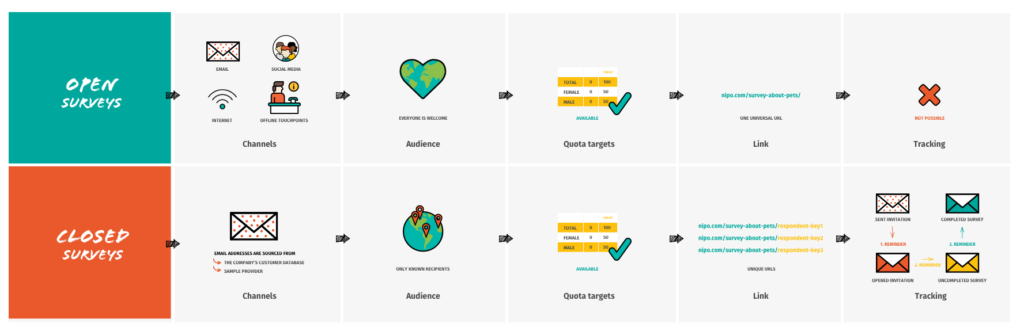
Open survey distribution boosts the organic reach of your surveys.
A survey is shared with anybody through one identical URL link, which is universal, public, and therefore anonymous. In the Nfield Online survey system, you copy the URL of the survey and paste it as a link directly into the email you send out.
The simplicity and uniformity of this link allows you to:
However, these two opportunities also mean you lose the control of the survey’s distribution. You can’t send out a reminder because you don’t know all the recipients it’s reached, or who has already completed the survey. The absence of tracking has one other major implication: a recipient can do the survey more than once.
Please note that the open distribution method is best used for surveys with a limited email list.
Tip
Get inspired by more creative options for distributing open surveys.
Closed survey distribution gives you more control.
A survey is shared though a set of URL links only with known recipients. Each URL link has a different unique ending which corresponds to a different individual recipient invited to take the same survey. In professional market research, these unique endings are known as respondent keys.
This system of unique links enables you to monitor the survey activity of every recipient. This means you also know what is happening throughout the entire recipient pool, so you can send out appropriate reminders at every stage to those who:
Nfield Online prevents recipients from responding more than once to the same survey’s questions. In the case of recipients who started but did not yet complete the survey, it also enables you to send them a reminder which takes them directly to the point where they stopped. All this results in clean and more credible survey data.
Because of these specifics, closed surveys cannot be distributed through any other channel. You always need an email list that is big enough to satisfy the survey’s requirements. In many cases, the company’s customer database is perfectly sufficient. But when it isn’t, the solution for professional market researchers is to use the services of sample providers.
Respondent keys
A respondent key is a random combination of characters and/or numbers added to the end of the survey link. It’s this combination which makes each survey link unique, even though it points to the same survey. This uniqueness enables Nfield Online to identify recipients and ensure that only those who were directly invited can participate in the survey.
domain.com/survey-about-pets/respondentkey1
domain.com/survey-about-pets/respondentkey2
domain.com/survey-about-pets/respondentkey3
 Note
Note
A respondent key can only be used once within the same survey. Never two or more times, as that would affect the monitoring. However, it’s possible to re-use a respondent key for more than one survey.
Sample providers
Sample providers administer extensive databases of individuals who at some point agreed to participate in surveys. Their databases usually contain basic sociodemographic data by which email lists are filtered. Sample providers also perform more detailed and time-consuming pre-selection of individuals according to survey requirements.
Thanks to unique respondent keys, once a survey project is finished, market researchers can inform their sample providers about which recipients didn’t start the survey or unsubscribed from the email list. This information is very important for a good email reputation and the privacy rights of recipients.
In addition to the administration of contact databases, sample providers incentivize recipients to participate in surveys. Respondents are typically redirected by Nfield Online to the sample provider’s website after completing the survey.
Even when you use Nfield Online to send your survey invitations to a contact list, it doesn’t necessarily mean all your invitations will arrive in their intended inboxes. As with any other marketing and sales emailing activity, the distribution of surveys through email is inspected under a set of rules known as email reputation. These rules decide whether the email is successfully delivered to inboxes, diverted into spam folders or blocked.
Email reputation directly affects the success of your online research, so make sure you find out everything you need to know in our two articles:
Request a demo to see how NIPO can help you meet your requirements with our smart survey solutions.