
Get a first impression, scheduled soon.
Request a demo to see how NIPO can help you meet your requirements with our smart survey solutions.
We asked market research professionals if their organizations are ready for the rapidly approaching validation of GDPR, and what their thoughts are about this topic. This article, which presents the most interesting questions from the survey, is certainly worth your attention because the answers provide an interesting insight into the GDPR readiness of market research organizations. Where does your organization stand? How would you respond?
Response: 75% of market researchers is aware of GDPR.
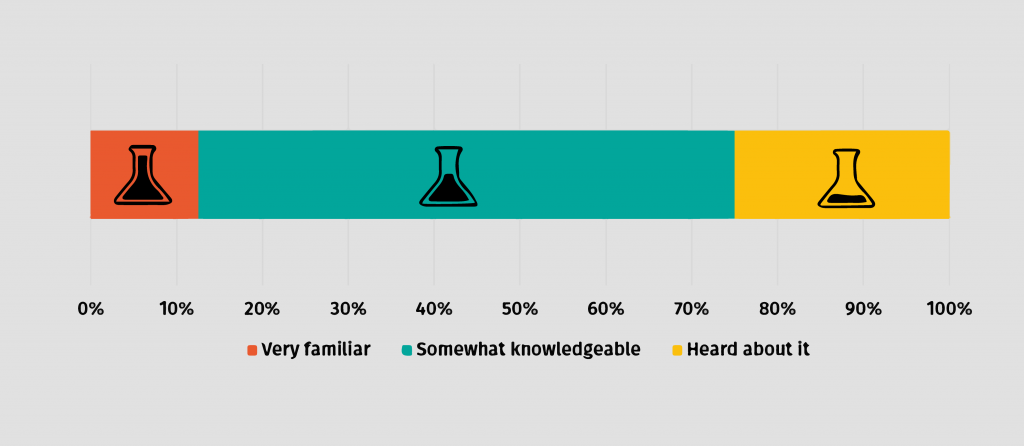
NOTE! Nobody chose the “This is the first time I hear about GDPR” option, which shows how seriously market researchers take the new data security legislation.
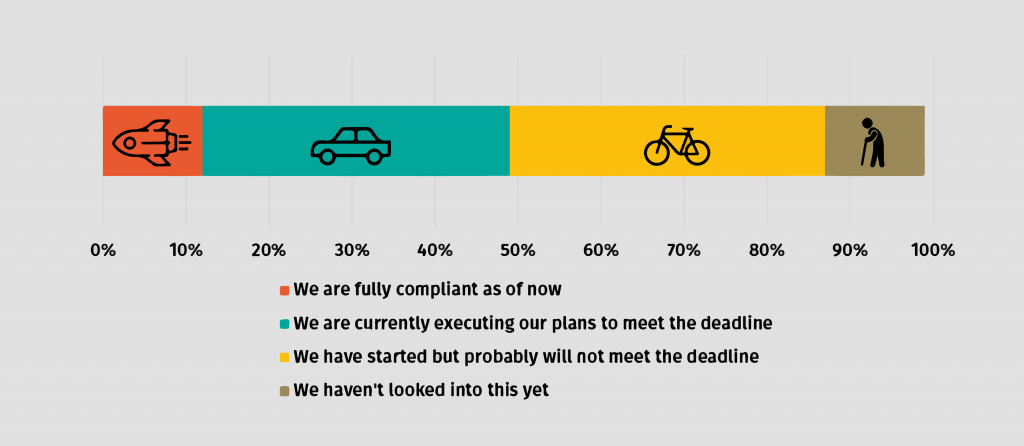
Response: Some of you are GDPR-ready, but many still have enough to do.
NIPO! Our ISO 27001:2013 certification and strong data security measures show how seriously we take it. We’ve always made sure that everything in our organization and survey software solutions has been built from the start following the highest security standards. This has already placed NIPO at the top of the GDPR compliance scale as our systems have been proven to be GDPR-ready even before this new legislation began to worry the whole market research industry. Our team is currently working on strengthening instruments that will help our customers comply with GDPR without troubling their survey projects operations. We will inform our customers in detail about these developments soon.
Response: Understanding is the most difficult part.
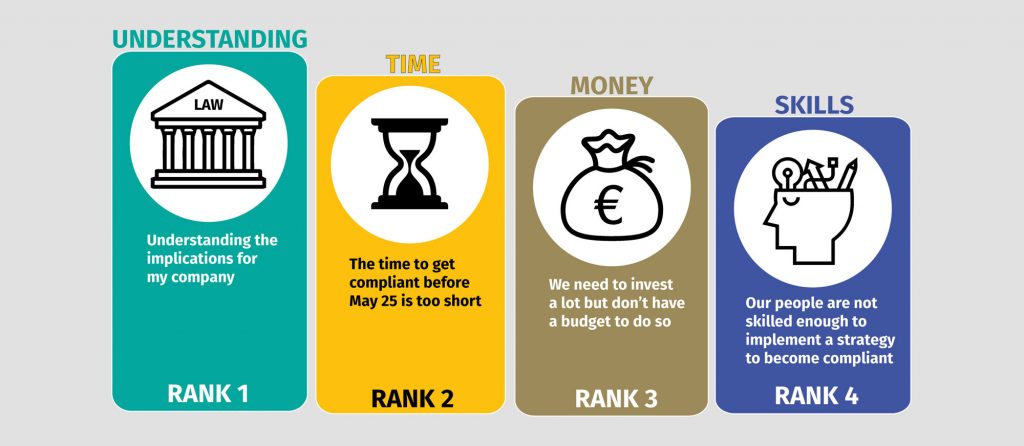
NOTE! GDPR was approved by the EU Parliament in April 2016, giving organizations a two-year transition period for making changes within their activities and processes to become compliant before the new standards come into effect in May 2018. We surmise that the robustness of the legislation, the risk of wrong interpretation, and the higher costs related to the changes deterred many organizations from starting the adoption on time.
Response: GDPR benefit: a stronger company reputation.
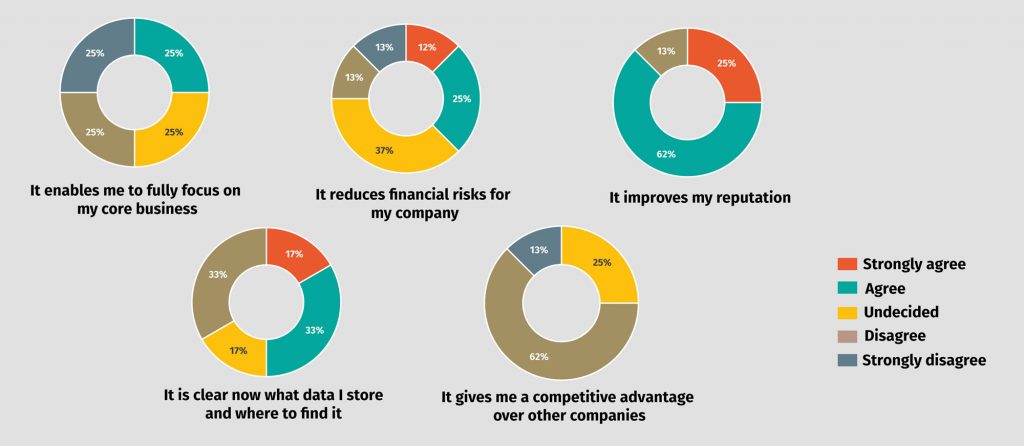
Response: Problems with the acquisition of consent are expected.
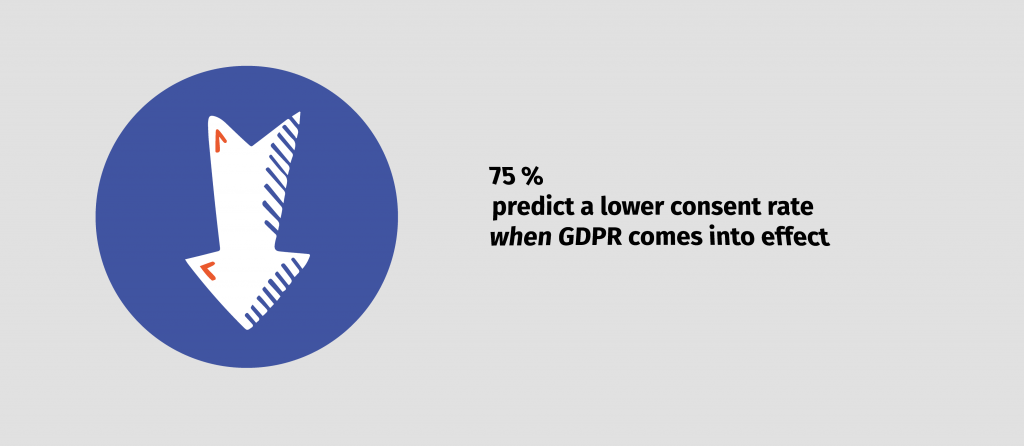
TIP! Now more than ever it’s important to have an up-to-date contact database and establish an honest, mutually-rewarding relationship with respondents. Clean your contact list with https://www.datavalidation.com/ or any other tool, and be honest with you respondents, telling them why their opinions matter.
Response: Researchers are confident about the security of data within own organization.
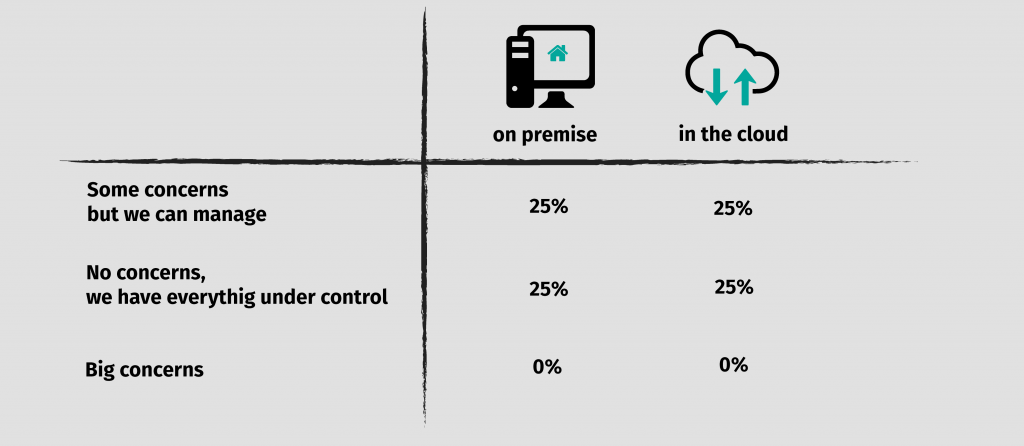
NOTE! What’s interesting about this result is that the respondents are equally confident about the security of on-premise solutions as well as cloud solutions. In the past many organizations did not always trust cloud solutions. The investments in security and compliance of cloud providers seem to have changed organizations’ views.
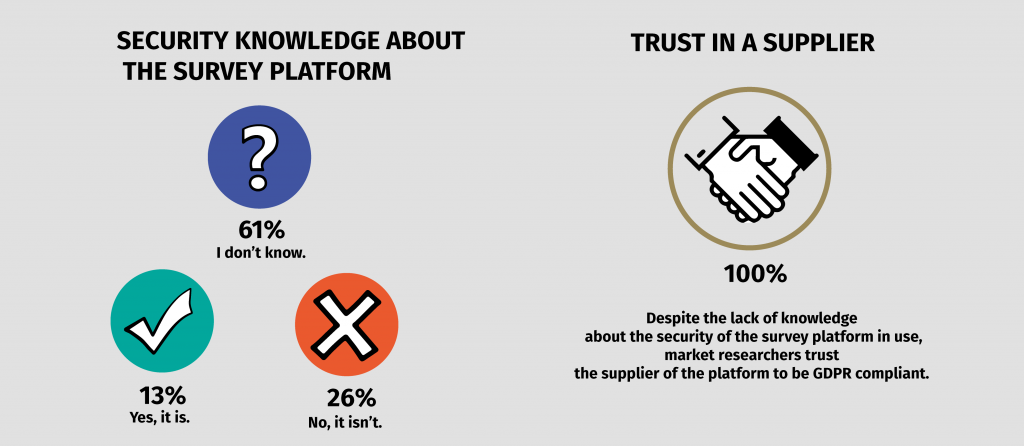
Response: Trust in the compliance of the survey platform in use is higher than the factual knowledge about it.
GDPR, which refers to the General Data Protection Regulation, aims to protect and strengthen the privacy rights of EU citizens, that have been clearly affected by the intrusive developments of the digital age. It comes into effect on May 25, 2018, and non-compliant organizations risk hefty fines up to 4% of global turnover or €20 million, and huge damage to their business reputation.
Among other things, it says that market researchers are required to have consent of every EU citizen to collect, use and share his/her personal data. Each consent has to define what personal data, for which purpose, and for how long the market research organization is allowed to hold it. Learn more about the important aspects of GDPR in our articles:
Do you have more thoughts about GDPR? Suggestions? Or questions? Contact our team at [email protected], we would be happy to hear from you.
Thank you for participating in our survey.
Disclaimer: This blog is made available by NIPO for the purposes of providing general information and a general understanding of GDPR, and should not be considered or used as a substitute for legal advice. NIPO does not accept any responsibility or liability for the accuracy, completeness, legality, or reliability of the information contained on this blog.
Welcome to the third post in our GDPR blog series. In the first post, we gave you an overall high-level look at GDPR. In the second post, we focused on the legal basis on which market researchers can process personal data. In this post, we will focus on pseudonymization and anonymization, specifically how these measures can help you protect individual’s personal data and comply with the GDPR.
Although similar, pseudonymization and anonymization are two distinct techniques that allow data controllers and processors to use data. The difference between the two techniques hinges on whether the individual data subject can be re-identified.
The concept of pseudonymization is one of the favoured techniques under the GDPR to minimize the amount of personal data that is held.
The GDPR defines pseudonymization as the processing of personal data in such a manner that the personal data can no longer be attributed to a specific data subject without the use of additional information. It further provides that in order for the data to be pseudonymized, the data must be kept separately and subject to technical and organizational measures to ensure that the personal data are not attributed to an identified or identifiable natural person. This means that the personal identifiers are removed from the data and stored in a separate database, and linkage to a specific individual will not be possible without the additional information that is held separately.
Although this technique detaches the link between the data and the data subject, pseudonymous data is still considered personal data under the GDPR because the detachment can be reversed and therefore, falls within the scope of the GDPR.
The application of pseudonymization to personal data can reduce the risks to data subjects concerned and help controllers and processors to meet their data protection obligations. The benefits of pseudonymization of personal data for controllers under the GDPR include:
Anonymization of data means that it irreversibly destroys any way of identifying a data subject.
Data can only be considered anonymous if re-identification is impossible by the entity holding the data. Using anonymization, the resulting data should not be capable of singling any specific individual out, of being linked to other data about an individual, nor of being used to deduce an individual’s identity.
As long as the data is anonymized, it is outside the scope of the GDPR because anonymous data doesn’t include any personal data. Anonymization reduces any risks to data subjects, for example, where there is a data breach because the data cannot be linked to any specific individual.
In principle, organizations can use anonymized data for purposes beyond those for which it was originally collected and it could be used indefinitely as the data is no longer classed as personal data. In addition, once the data has been anonymized, then controllers do not have to respond to data subjects’ requests because they can no longer identify a data subject.
Pseudonymization techniques are different from anonymization techniques, however, they are both measures used to protect personal data and reduces any risks to the data subject. Both pseudonymization and anonymization are encouraged in the GDPR and enable GDPR compliance.
Disclaimer: This blog is made available by NIPO for the purposes of providing general information and a general understanding of GDPR, and should not be considered or used as a substitute for legal advice. NIPO does not accept any responsibility or liability for the accuracy, completeness, legality, or reliability of the information contained on this blog.
This is the second post in our GDPR blog series. In the first post, we gave you an overall, high-level look at GDPR. In this second post, we will focus on the legal basis on which personal data can be processed, more specifically on the legal bases that market researchers can rely on to process respondents’ personal data.
The GDPR provides several legal grounds on which the collection and processing of personal data can be based. In order to lawfully process personal data, at least one of these grounds must apply.
The collection and processing of personal data are fundamental to the work of many market researchers. Therefore, it is imperative to know and understand what lawful basis can be used to process respondents’ personal data. For market researchers,the two most common lawful basesto process personal data are:
The approach to deciding what lawful basis researchers should use for processing personal data may vary by member states, as domestic markets may have different characteristics. Researchers need to assess what legal basis are most used within their individual jurisdiction, and comply with any national research code of conduct, in addition to the GDPR requirements.
Consent of respondents will often be used as the lawful basis for carrying out research in many EU member states. The GDPR retains the concept of consent contained in the 1995 directive, but raises the bar for considering it valid, by setting out additional requirements.
Under GDPR consent shall be:
Where data processing has multiple purposes, consent should be given for all of them, unless such purposes are considered compatible. This essentially means that the data controller (market research company or its client) can further process personal data, where the purpose of the processing is compatible with the purpose for which the personal data was initially collected.
If a company that produces chocolate wants to know, through a survey, how many adults (ages 18-40) eat their chocolates, it needs to obtain consent for the processing of the respondents’ personal data and specify to the individuals the purpose for which they will be using such data, which is to know how many adults in that age range eat their chocolates. After completing the survey, the chocolate company compiled a list of the people that eat their chocolate often, this list is then used for direct marketing (they send emails and posts to the individuals about their new products). This will be considered incompatible with the purpose for which the respondents’ personal data was collected because the chocolate company never informed the respondents that they would use the information collected from the survey for profiling or direct marketing, and the respondents did not give their consent for the use of their data for this additional purpose.
If the legal basis used is consent, researchers must understand what GDPR consent means and the fact that respondents will generally have stronger rights (right to erasure, right to data portability) where consent has been given.
There is a higher threshold for consent when the processing involves sensitive personal data. The GDPR provides that the respondent must have given his/her ‘explicit’ consent, but it does not specify what ‘explicit’ consent entails. Therefore, existing interpretations and guidance from legal advisers and/or supervisory authorities should be consulted.
The Article 29 Working Party (an advisory body made up of a representative from the data protection authority of each EU Member State), in its guidelines on consent, provided that the term ‘explicit’ is the way consent is expressed by the data subject. This means that the data subject must give an express statement of consent. It further stated that, in order to make sure consent is explicit, the data subject must have given consent in a written statement (e.g. signed statement) or an oral statement.
Going back to the survey in the earlier example, let’s suppose the chocolate company also asked about health information (i.e. how many are diabetic) of the respondents, the purpose is to enable them to improve their products so their diabetic customers can continue to consume, but with reduced health implications. All health information is considered sensitive personal data under GDPR, and so before the data can be collected and processed, the individuals must have given their explicit consent for this use of the data (granularity will allow respondents to consent for each processing activity).
Children’s personal data is further protected under GDPR. If the research project involves respondents (children) that are below the age of 16 (age limit can change based on the jurisdiction), GDPR states that parental consent must be obtained in order for the processing to be lawful, if you intend to rely on consent.
The GDPR makes clear that consent is not a one-off compliance box to tick and file away, it is an ongoing actively managed choice. It is important to keep records of consent (i.e. how it was obtained, for what purposes and what was consented to).
Data subjects’ consent needs to be regularly reviewed to ensure that the consent is still valid. The GDPR does not give a timeframe for consent to be reviewed, this has to be determined by the controller (market research company or its client), taking into account its needs as well as the rights of individuals, and preferably included in its internal procedures.
The term “legitimate interest” refers to the reasonable business purpose that the market research company processing the personal data may have to process data. This may include a benefit inherent in the processing of the company itself or society at large.
The GDPR provides that the legitimate interests of the controller (or third parties) must be necessary for these purposes, except where such interests are overridden by the rights and freedoms of the data subject which require protection of personal data. This means that researchers need to determine whose legitimate interests (market research company or a third party) and understand what exactly the legitimate interests are.
Researchers using legitimate interests as a lawful basis, need to, first of all, do an assessment before processing any personal data of respondents. This assessment is referred to as a balancing test. The balancing test is weighing between what the controller considers a legitimate interest on the one hand, and what the rights of the data subjects are on the other hand.
The balancing test must always be conducted fairly, there are several factors that need to be considered, these include:
An example of legitimate interest is in a situation in which a market research company recalls respondents for quality control purposes, although the respondents have not consented to such recall. In this case, the legitimate interest of the market research company is to perform a quality control, while on the other hand, there are the rights of the respondents.
In order to ensure that the rights of respondents are not infringed, the balancing test needs to be applied: after identifying what the legitimate interest is (quality control), the market research company needs to look at what type of data is involved, and to put in place appropriate safeguards (among others encryption or pseudonymization) to protect the personal data of respondents. Only at this point, will it be possible to assess the existence of a balance and the consequent validity of the legitimate interest.
The GDPR provides several legal grounds on which personal data can be processed, however, when it comes to market research, not all the lawful basis can be used. Researchers need to identify which of the lawful grounds for processing can be used for the particular research project before processing any personal data of respondents. As explained above, in most cases, obtaining consent from respondents is the best option, while in other cases, using legitimate interests as a lawful ground may also be appropriate.
If legitimate interest is the legal basis chosen by the market research company for the processing of respondent’s personal data, then it must ensure that it has carried out a fair balancing test. If the balancing test shows that the controller’s interests do not outweigh the rights of the data subject, then legitimate interest cannot be relied upon and the market research company will have to use another lawful basis (e.g. consent) in order to process this personal data.
The relationship between reputation and business success is a well-known fact. While a good reputation improves sales performance and increases a brand’s value, a bad reputation can rapidly take a business downhill. Aware of this, many companies pay meticulous attention to detail when it comes to product quality and customer service. Yet they often overlook the need to also maintain a good email reputation, which directly impacts the ability to communicate online.
Email reputation is a technical metric which email service providers use to decide the ‘credibility’ of sent messages. It is defined by a score relating to the sender domain (i.e. the “nipo.com” part of an email address).
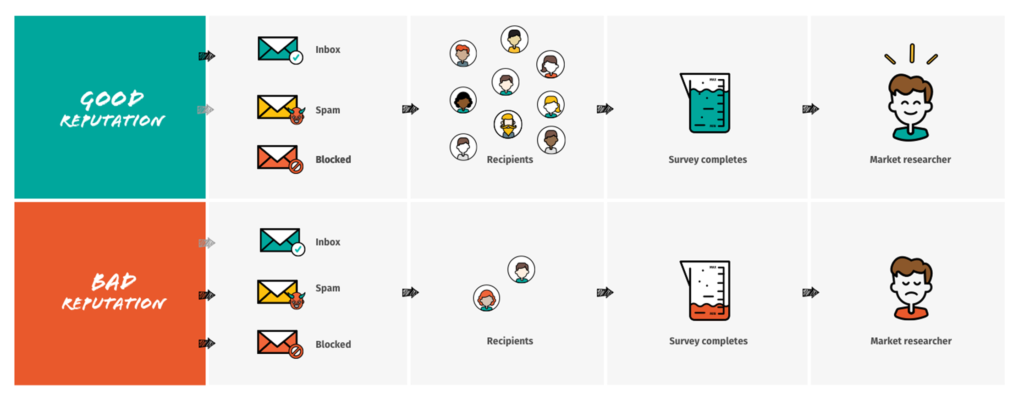
This score, which can continually change, determines whether messages get delivered into recipients’ inboxes, spam folders or are even delivered at all. You can think of it a bit like a personal credit rating, which banks use to decide whether they should lend you money.
There’s no point in sending out a survey invitation if it won’t arrive in recipients’ inboxes. If your sender domain has a bad reputation, your message is likely to be swallowed into people’s spam folders or, worse still, be blocked from being delivered at all.
But if care has been taken to adopt good practices which result in a good email reputation, your survey invitations are much more likely to arrive in a place they’ll be seen, reaching recipients’ inboxes directly and without delay.
The sender domain’s email reputation can therefore make or break the success of your market research project.
The ease and cost-effectiveness of using email to communicate with consumers and companies alike has led to staggering amounts of email traffic. There are currently 3 billion email users worldwide, and rising – approximately 50% of the planet’s population.
Unfortunately, this simplicity and accessibility has given rise to spamming and dishonest emailing practices, by which irrelevant or unsolicited emails are sent, typically to a large number of recipients, for the purposes of advertising, phishing, and distributing malware. This has turned into a big business, with various reports estimating that spam messages account for 50 – 80% of the world’s email traffic.
Email service providers needed to do something to protect email recipientsfrom the influx of unwanted and dangerous emails, which has resulted in the email reputation system currently in use.
 BE HAPPY
Most of the world’s email traffic is spam. Email reputation is intended to help legitimate messages, like your survey invitations, take priority.
Email reputation is the total result of combining a number of quantitative metrics designed to evaluate how honest and well-targeted emails from a particular domain are. The total score a domain accrues determines whether its outgoing messages are blocked, directed to spam folders or successfully delivered to inboxes.
Whatever role you work in, it’s worth understanding the two most fundamental aspects of email reputation:
And this is one of the most difficult things with email reputation: it can take a long time to earn a good reputation, but it is possible to destroy it in an instant. Vigilance in responsible email practices needs to be applied at all times.
If you want impressive response rates, look after your email reputation!
Events and aspects which are widely understood to damage email reputation include:
Recipients marking email as spam – The more times your emails are marked by recipients as spam, the more likely email service providers are to conclude that you’re sending unsolicited messages.
Poor email engagement – Email providers are interested in how relevant your messages are to their recipients, and they judge this by what percentage of the mails get opened. A low open rate is considered to mean recipients aren’t interested in them.
Invalid recipient addresses – Sending messages to invalid email addresses is fatal for your email reputation. It’s a clear sign that you don’t actually know who you are sending your messages to.
Type of email content – Email providers have become very skilled in identifying certain keywords and phrases which are likely to indicate an email as being unsolicited or dangerous. All messages are scanned for these.
Unverified sending domain – Dangerous senders often try to pretend to be someone they are not by using someone else’s domain. Many email service providers therefore block emails coming from an unverified sender domain.
Irregular frequency and volumeof emails – Because spammers don’t tend to have a consistent send frequency, email providers look at how often your messages are sent out. Changing the frequency may damage your email reputation.
Lack of history – If there is no history, email providers cannot draw any conclusions about your intentions. Remember that you start enhancing or damaging your email reputation from the first send-out.
The good news is that you can always have control over your email reputation.
To find out how, check out our practical guide on building a good reputation and ensuring smooth delivery of all your survey invitations sent out by Nfield Online.
 NEXT STEP
Learn how to build a good email reputation and deliver more survey invitations.

The General Data Protection Regulation (GDPR) comes with strong implications for all kinds of industries, and the market research industry is no exception. Since personal data collection is an essential part of many research projects, professional researchers and their survey software providers need to get prepared for the significant changes that are about to come. NIPO is convinced of the importance of GDPR compliance. Accordingly, we want to make sure that the NIPO organization and the Nfield platform are GDPR compliant. This is an important benefit for our customers, however, on their part, they will also have to make sure their organization and services are compliant. In order to help customers with this, NIPO will share information about GDPR and provide advice. We will also keep our customers updated on how we are working to be GDPR compliant. The GDPR becomes enforceable from 25 May 2018 after a two-year transition period, so get ready and read the most important GDPR information we selected especially for you. More Blogs will follow in the near future.
GDPR is a new piece of regulation which will become law across the EU in May 2018. It replaces the 1995 EU Data Protection Directive. The aim of GDPR is to protect the fundamental rights and freedoms of all EU citizens, in particular, their right to the protection of personal data. It is a response to the public outcry over privacy and a common practice when some companies swap access to personal data for use of their services.
As a result, GDPR has been designed to give people more control over how their personal data is used and introduces tougher fines for non-compliance and breaches. It also makes data protection rules more or less identical throughout the EU.
GDPR applies to any company that collects data from EU citizens regardless of the company’s location and country of origin. Typically, you can then think about four business scenarios:
 REMEMBER!
What matters is whether the company deals with data belonging to EU citizens.
GDPR defines two roles: controllers and processors.
A data controller determines the purpose (why) and means (how) of the processing, while a processor is responsible for doing the actual processing of the data on behalf of the controller. So the controller could be any organization, from a profit-seeking company to a charity or government. A processor could be for example an IT firm doing the actual data processing.
Both controllers and processors have a responsibility to abide by the rules provided in GDPR. What’s new is that GDPR places direct compliance obligations on data processors for the first time at EU-wide level. So, now data processors are subject to liability if they fail to comply with their contractual obligations (e.g. failure to report a data breach) to their controllers.
Before GDPR, the directive defined personal data as any information relating to an identified or identifiable natural person.
GDPR specifies and broadens the definition of personal data to include online identifiers (cookies, IP addresses etc.), genetic data (an individual’s gene sequence), biometric data (fingerprints, retinal scans etc.), location data (GPS etc.).
Other data, like economic, cultural or mental health information, are also considered personally identifiable information. Genetic and Biometric data are considered as Sensitive personal data under GDPR.
GDPR significantly toughens consent rules. Under GDPR, consent must be an active, specific, informed and unambiguous action taken by the EU citizen. This also means that the passive acceptance methods, such as pre-ticked boxes and opt-outs, are not allowed anymore. Also, controllers must keep a record of how and when an individual gave consent so that they can demonstrate exactly what and when someone agreed to.
 DEFINITION
Opt-out consent also known as giving consent by not declining to give consent, means that an individual is given the option to decline consent. If the individual does not clearly decline consent, consent is granted. Pre-ticked boxes are boxes pre-ticked by the company, which takes the active consent action away from the individual.
Ultimately, GDPR puts the control of personal data back into the hands of EU citizens by introducing a number of new rights that bolster their position. The new rights especially affect how controllers can process and keep people’s data.
It is the responsibility of the controller to inform the local data protection authority of any data breach that risks people’s rights and freedoms within 72 hours of the company becoming aware of it. Those who fail to meet the 72-hour deadline could face a penalty of up to €10 million or 2% of their global annual turnover, whichever is higher.
For violations related to the lawfulness of processing (consent, legitimate interest etc.), data subject rights, and cross-border transfers, the data protection authority could issue a penalty of up to €20 million or 4% of their global annual turnover, whichever is higher.
There are several questions companies need to ask and answer in order to begin the process of compliance with GDPR, below you will find some questions that need to be considered:
1. What is the relationship between my company and NIPO, are we controllers or processors?
In the relationship between your company and NIPO, your company is the controller and NIPO is the processor. This means your company determines what data needs to be collected, and the purpose of collecting the data, and then NIPO processes the data collected on the Nfield platform.
2. Does my company process personal data?
The first thing any company needs to know is whether or not it processes personal data. This is relevant in order for the company to identify what type of personal data it has, does it include sensitive data? where is the personal data stored? who has access to this data? is this data shared with third parties? do you transfer the data outside the EU? Knowing the answers to these questions will improve efficiency, and enable you to access the data and act on it quickly and reliably.
3. Which lawful basis for processing is used by my company?
GDPR provides several lawful bases (consent, legitimate interests etc.) for the processing of personal data. The company needs to identify which one it uses to process personal data. It is important to identify the lawful basis you use for processing because it has an effect on individual rights. For instance, if you rely on someone’s consent to process their data, they will generally have stronger rights (e.g. request to have their data deleted).
4. Does my company have any procedures in place to handle data subjects’ requests?
Is there a software already in place that allows data subject’s exercise their rights (e.g. right to be forgotten), is there a timesale to respond to data subject’s request (e.g. right of access)? Knowing if you already have procedures, will enable you to quickly respond to data subject’s requests, and if there aren’t any procedures in place, then you can begin to work on having new procedures.
5. Is my company prepared for a data breach?
In cases where there is a data breach, do you have mechanisms in place that detect data breaches? are there any processes in place to address data breaches? This is important because if you have mechanisms to detect data breaches, it allows you to address the breaches quickly and mitigate its possible adverse effects, where appropriate effectively.
 DON’T MISS
This was the first of a series of blogs on GDPR becoming effective. Watch out for our regular updates. If you have any questions in the meantime, please get in contact with our Sales team by sending an email to [email protected]
Disclaimer: This blog is made available by NIPO for the purposes of providing general information and a general understanding of GDPR, and should not be considered or used as a substitute for legal advice. NIPO does not accept any responsibility or liability for the accuracy, completeness, legality, or reliability of the information contained on this blog.
Cyber attacks are continuing to increase globally in both number and scale, impacting all kinds of organizations in all kinds of industries. Every company is a potential target. Which means market researchers need to be as aware as anyone about the possible threats and take the necessary preventative action. This calls for being armed with the relevant knowledge and having a system which robustly protects survey data and, with that, company reputation.
A single “NotPetya” ransomware attack in June 2017 led to Nurofen maker Reckitt Benckiser taking an estimated EUR 110 million hit in revenue*.
*source: the Guardian 6 July 2017
Just think about what would happen if your company falls victim to malware which compromises your entire fieldwork operation, causing irretrievable loss of your fieldwork and respondent data. Not to mention the damage done to your client relationships.
We did, which is why NIPO’s Nfield survey systems are designed to keep cyber attackers out. But optimal cyber security also depends on good human awareness of the threats, so people themselves do not become the vulnerable weak link. We therefore held a webinar about cyber security to educate our customers and help them protect their interests.
In this, NIPO explains why IT security in market research matters to you, provides guidance on what you can do to keep cyber attackers out and answers questions such as:
Find out more
For more details on how NIPO ensures cyber security in its solutions and business, see the Nfield security factsheet.
So what’s next?
If you would talk about whether your current solution meets the required security standards, then let us know. You can contact us at [email protected].

Sending interviewers to targeted locations requires specific distribution options within the software itself, all of which can be found within Nfield CAPI. Have you already heard about sampling points?
In face to face interviewing, we refer to sampling points when talking about survey distribution. So what are sampling points?
From a technical perspective, sampling points are a way of categorizing interviews into certain groups (points). Categories could literally be anything: streets, areas, cities, or even experienced interviewers in one sampling point and less experienced interviewers in another.
In practice, sampling points are commonly used for a geographical distribution of interviews. The usage of sampling points helps you
Thanks to sampling points it’s easy to assign interviewers to interviews and control your fieldwork!
The geographical categorization helps to divide and manage the fieldwork and survey targets because interviewers may live in different areas or because you need to find respondents across a number of areas.
For example, when working on an international project involving many countries (offices worldwide), one sampling point could be one country (one office) with many interviewers.
Or in another case, when working on a local project, the town could be divided into parts with each one assigned to a different interviewer as a sampling point.
The following examples are theoretical and meant to explain you the main differences.
1. Surveys without sampling points and without quota
Non-geographical distribution is defined and your interviewers can ask anybody and anywhere.
Typical situation: polls
Example 1 without quota and sampling points actually means no table at all.
2. Surveys without sampling points and with quota
Non-geographical distribution is defined by sampling points, but please note that a quota frame can still be used for geographical distinction. The fieldwork is controlled through the total target that is placed in the software.
Typical situation: the interviewers who live in different cities interview people who are randomly passing by
Example 2 with quota, but no sampling points
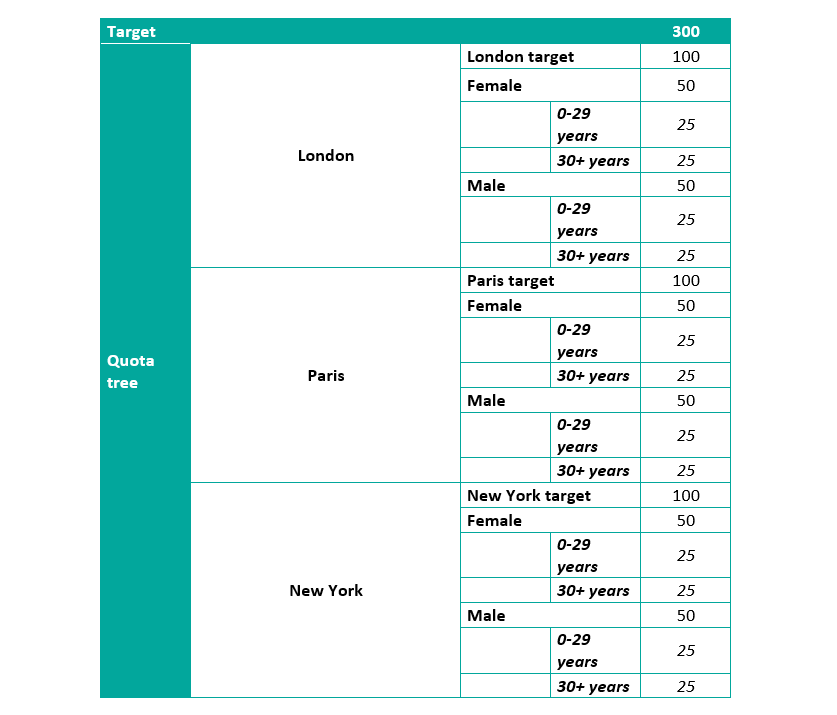
3. Surveys with sampling points and quota
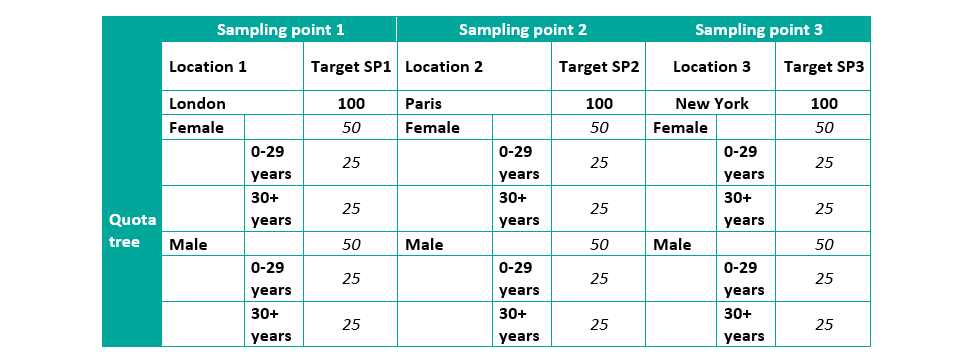
Geographical locations with the targets as the sampling points (Amsterdam East, Amsterdam West, Amsterdam South) need to be uploaded first, and then a quota frame with sample characteristics (female, male) should be set up. The fieldwork should be controlled through sampling points, not the total target. The sum of the sampling points targets is your total target, but having the total in the software does not help you control the fieldwork better.
Typical situation: a complex set-up used for international or national projects when a detailed distribution is needed
Example 3.1. with sampling points and quota, less items

Example 3.2. with sampling points and quota, more items
Computer-assisted-telephone interviewing (CATI) guides the interviewer step-by-step through the questionnaire, dials telephone numbers according to a certain criteria set and analyzes processes in the background to enhance your cost and operations efficiency. Did you know that…
Until the 1970s telephone data collection relied on the use of paper questionnaires, which were administered by interviewers over the telephone. The data from the paper questionnaires then had to be manually edited, keyed, and processed before results could be distributed.
As computers advanced, becoming smaller and more powerful, the concept of utilizing them to conduct surveys was pursued. From simple solutions with basic options, CATI soon evolved into complex engines, and NIPO is proud to own one of the most proven and renowned CATI solutions on the market today.
When selecting a software solution, there are two options for conducting your telephone research: on premise or cloud CATI solutions. NIPO offers both options so you can choose the one that suits you best.
Our CATI solutions power the largest telephone surveys in the world. Amongst market researchers, it’s wildly accepted as a reliable and robust telephone data collection platform. Our Sales Team are keen to work with you to understand your needs and assess what solution would work best for you.
The key features of our CATI are:
Even more, our CATI solutions offer advanced capabilities such as auto, progressive and predictive dialing to help you drive productivity.

Face-to-face interviewing is a complex process comprising interviewers, mobile devices and software. A multitude of elements within this process can make a project prone to mistakes, leading to a delay in the delivery or even data loss. Outlined below are our essential tips for some of the most common problems associated with face-to-face interviewing to help you ensure a smooth execution of all CAPI projects.
The Nfield CAPI app runs on all Android tablets and smartphones, though not every device will serve you accordingly. We recommend that you run through a checklist mapping the factors that come into play when selecting the right CAPI device.
Security of your data is an absolute priority to us. Rest assured that we do our utmost to keep your data safe, however you also have a crucial role to play in data security by following a few simple rules:
… by informing your interviewers thoroughly about how to use the Nfield app.
There are two types of software updates that you need to be aware of:
Nfield CAPI app updates (NIPO)
The Nfield CAPI app is managed by NIPO, and any updates are designed solely to augment the features of the app. Every release automatically updates the backend of Nfield CAPI but requires the manual intervention of the interviewer to take effect on the device.
 IMPORTANT
Please ensure your interviewers allow automatic updates of the Nfield CAPI app so that they are working with the latest version which supports data security and provides the most-up-to-date features to them. To allow automatic updates, ask your interviewers to open the Play Store app and set the Nfield CAPI app setting to “Allow automatic updating.” Our Support Team will always send you detailed information via email about any app updates the day before the new version is released, so please do look out for these.
Android operating system updates (Google)
All Android operating system updates are managed by a third party – Google. These updates impact the software that the whole device runs on; they are not primarily calibrated to Nfield CAPI functionality.
The Android operating system update usually starts by a window which automatically opens on the screen asking for permission to update the operating system. The interviewer will need to consent to this before any updates can take place. In other words, the update doesn’t happen automatically.
Whilst we thoroughly test all major updates of the Android operating system to examine whether Nfield CAPI features have not been affected, due to the diversity of mobile devices available and the number of versions of the Android operating being used at any one time, it makes in-depth testing on a large scale impossible.
IMPORTANT
Only update the operating system on a few devices first to ensure everything still works as it should before you push out an extensive update across all of your devices. Inform your interviewers that they shouldn’t update the device without your consent to prevent unwelcome disruptions of the fieldwork. By acquiring the aforementioned Mobil Device Management (MDM) service, you can even manage and schedule software updates for all devices yourself. And most importantly, our Support Team is always on hand to help you.
Experienced researchers and fieldwork executives dive into Nfield CAPI without any hurdles. The same applies to scripters who are already familiar with the ODIN language. For those users who require full scale onboarding, we offer introductory and tailored training.

Quality control is a process when fieldwork executives look into various source files to evaluate whether the interviews have been conducted with honesty and accuracy. It is in the researchers’ best interests to ensure that the data delivered to customers comply with the highest quality standards.
In Nfield CAPI you can use location tracking and silent recording with ease to verify data and the credibility of your interviewers.
Silent recording enables you to record either the whole interview or parts of it without the interviewer’s knowledge. It is set up via scripting by inserting a simple command.
Location tracking means collecting unbiased information about the locations where your interviews have been conducted. To allocate an interviewer, the device has to be equipped with:
In addition to the aforementioned methods, you can utilize Nfield CAPI for:
You can reject interviews that do not meet the quality standards in Nfield CAPI which will then eliminate them from the complete target counts and exclude their data from the overall survey data.
False or insincere interviews provide useless data that cannot be delivered to customers, nor do they support the researchers’ objectives. The situation can even tarnish your reputation if the wrong data is used for expensive, important analyses that influence customers’ business decisions. Whilst the majority of interviewers respect their job and the nature of their work, there will always be a small percentage who will try and find shortcuts.
A lack of quality control usually results in more cases of false interviews. Pen and Paper researchers struggle with quality the most. Based on our experience, a few dishonest interviewers are revealed at the start when switching from Pen and Paper to CAPI, and as soon as the interviewers realize that the quality of their work is being thoroughly checked, the number of unfortunate incidents decline. Further features of the quality control system then prevents a come-back of dishonest practices.

Request a demo to see how NIPO can help you meet your requirements with our smart survey solutions.